HP Support Assistant functions as a central hardware management and diagnostic utility built directly for individuals and IT administrators operating HP desktop computers and laptops. Instead of forcing users to identify specific motherboard chipsets, audio controllers, or display adapters manually, this desktop client scans the local machine, compares the active hardware profile against official vendor databases, and queues the exact required driver packages. It handles the deployment of low-level firmware flashes and standard peripheral drivers in a controlled environment, reducing the risk of installing mismatched components that cause blue screens or system instability.
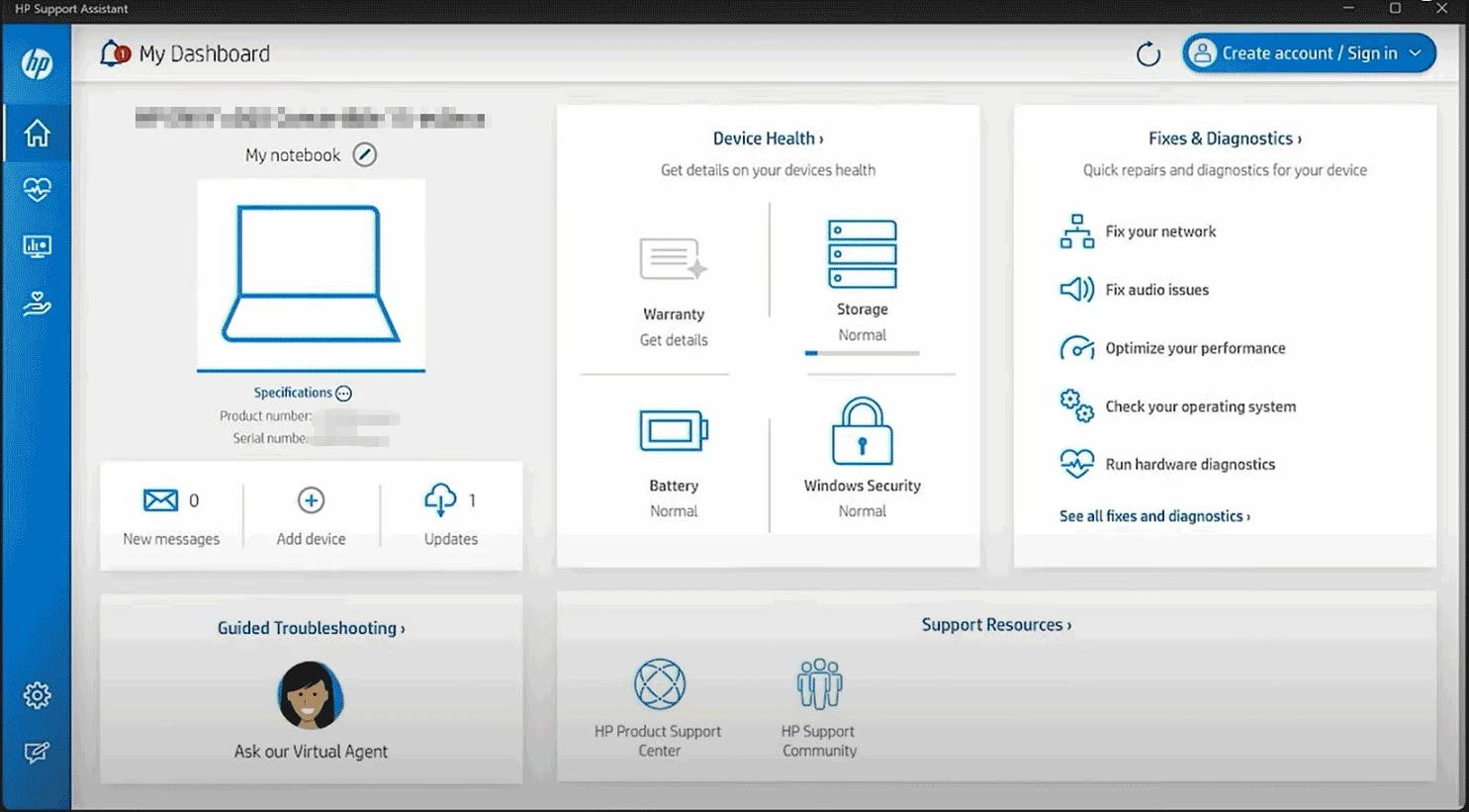
Beyond standard driver management, the application serves as an active diagnostic hub for assessing physical hardware health. Users rely on the local client to read battery degradation levels, test memory modules, verify storage drive integrity, and reset network adapters without navigating through complex command-line utilities. A dedicated desktop application handles these tasks much more effectively than a browser-based scanner because it requires elevated system permissions to read motherboard sensors, interact with the BIOS, and manage background Windows services directly.
The utility is specifically built for HP environments, meaning it reads vendor-specific BIOS strings and service tags to confirm exact warranty statuses and available care packs. By keeping the hardware polling local and communicating directly with HP servers, the client bypasses the generic, sometimes outdated hardware catalog provided by standard Windows updates. This direct pipeline ensures that critical thermal management updates and specialized peripheral drivers reach the machine directly from the manufacturer.
Key Features
- Automated Firmware and Driver Deployment: The utility scans the motherboard chipset, graphics interfaces, and network adapters to match current drivers against the official catalog. It queues and installs specific motherboard firmware and peripheral drivers automatically, avoiding the risks of manually forcing incompatible packages through the Windows Device Manager.
- Hardware Diagnostics and Battery Health Check: The client reads physical sensor data to evaluate the operational status of internal components. It runs specific sector checks on storage drives and reads charge-cycle counts on laptop batteries, outputting a clear pass, fail, or warning status alongside exact remaining warranty capacities.
- Operating System Check Tool: Instead of relying solely on built-in Windows troubleshooters, the utility initiates a targeted scan of the local OS environment. It verifies background service integrity, checks for corrupt system files that might block driver installations, and applies registry corrections needed to keep the machine communicating properly with the vendor update servers.
- My Devices Management Tab: Users managing multiple hardware units can link them within a single interface by signing in with an HP ID. The dashboard lists the service tag, model number, and pending updates for each linked desktop, laptop, or printer, allowing administrators to monitor the update status of remote hardware without physically accessing each machine.
- Network and Audio Troubleshooting Tasks: When standard connections fail, the software provides single-click diagnostic routines that reset the network stack, flush DNS caches, and restart audio endpoint services. These automated routines execute the exact command-line fixes typically required by support agents, resetting the adapters to factory default states to clear configuration conflicts.
- Virtual Agent Escalation: For issues that the automated scripts cannot resolve, the interface connects directly to a vendor-provided diagnostic chat system. The client passes the machine exact hardware profile, serial number, and recent error logs to the virtual assistant, bypassing the need to manually type out hardware specifications before reaching a technician.
How to Install HP Support Assistant on Windows
- Download the official Windows installer package directly from the vendor support portal, ensuring you save the executable file to your local drive rather than running it from a temporary browser folder.
- Double-click the downloaded setup file to launch the initialization sequence. The installer will first check your current Windows environment and verify that the target machine meets the necessary architecture requirements.
- Accept the end-user license agreement and choose whether to allow the vendor to collect anonymous usage telemetry. You can opt out of the data collection toggle without restricting the core functionality of the diagnostic tools.
- Allow the setup wizard to extract the necessary background services and diagnostic scripts to your primary system drive. The installer will register the required scheduled tasks that allow the program to check for updates in the background.
- Click Finish once the progress bar completes. The application will immediately launch its first-run configuration wizard and prompt you to create or sign in with an HP ID.
- Choose your preferred update schedule. You can set the client to download and install critical firmware automatically, or configure it to only notify you when new packages are available so you can trigger the installations manually.
- Restart the computer if the installer prompts you to do so. This reboot ensures that the newly registered hardware polling services start correctly alongside the operating system shell.
HP Support Assistant Free vs. Paid
HP Support Assistant is provided entirely at no cost. The vendor does not charge for the application itself, and there are no premium tiers, pro licenses, or enterprise subscription requirements to unlock the core diagnostic and update features. The software functions primarily as a value-added utility intended to maintain the operational health of the manufacturer hardware ecosystem, reducing warranty claims and support calls.
While the application itself requires no payment, it does act as a portal to manage commercial services. Within the interface, users will see the remaining duration of their included hardware warranty and find direct links to purchase extended coverage plans, such as HP Care Packs. The client also highlights supplementary paid support options, including HP SmartFriend Services, which provides remote IT assistance for out-of-warranty issues.
None of these paid services are required to use the software. The driver update pipelines, battery diagnostics, and network troubleshooting tools remain fully functional regardless of whether the machine is currently under an active warranty or an extended care plan. Users will not encounter artificial export limits, trial timers, or diagnostic paywalls when attempting to fix local system errors or deploy motherboard firmware.
HP Support Assistant vs. Dell SupportAssist vs. Lenovo Vantage
Dell SupportAssist operates as an automated diagnostic engine built specifically for Dell hardware. It is known for its deep integration into the pre-boot environment, allowing it to catch failing hard drives or memory modules before the operating system even loads. However, Dell software frequently runs background scans that consume significant processor resources, and its automated recovery partitions take up substantial local drive space. Users who require strict control over their background processes often prefer avoiding the heavier client unless they are actively managing an enterprise fleet of Dell machines.
Lenovo Vantage serves a similar role for Lenovo desktops and laptops but places a stronger emphasis on consumer customization. Alongside standard driver updates, Vantage includes granular controls for keyboard backlighting, camera privacy toggles, and specific battery charge thresholds designed to extend hardware lifespan. The main drawback of the Lenovo application is its interface, which frequently displays promotional banners and up-sell advertisements for secondary software. Users who just want a quiet, functional update utility often find the commercialized dashboard distracting.
HP Support Assistant provides a focused middle ground, concentrating heavily on clear diagnostic readouts and straightforward driver deployment without attempting to manage cosmetic hardware features like RGB lighting. It avoids the heavy pre-boot footprint of the Dell software and generally presents a cleaner, less commercialized interface than Lenovo Vantage. For individuals running HP hardware, it is the most direct and accurate way to match specific motherboard revisions with the correct firmware, making it the clear choice over attempting to force generic updates through third-party driver scanners.
Common Issues and Fixes
- Application fails to launch or hangs on the splash screen. This usually occurs when the background service crashes or browser cache files interfere with the interface rendering. The most reliable fix is to uninstall the program via the Windows Settings menu, restart the computer, and install a fresh copy from the official vendor site.
- Hardware scans stall indefinitely while gathering information. This happens when the local client loses synchronization with the vendor update catalog. Open the Windows Services manager, locate the HP Support Assistant Service, right-click it, and select Restart to force a new connection to the catalog servers.
- Driver updates repeatedly fail to install. This is often caused by conflicting existing drivers or pending Windows updates blocking the installer. Clear the failure by opening the Windows Device Manager, manually uninstalling the problematic device driver, restarting the machine, and running the update scan again.
- High CPU usage during idle periods. The application periodically runs scheduled tasks to inventory hardware and check for warranty status. If the process locks up and consumes resources continuously, open the application settings and change the update schedule from automatic to manual, which prevents the background scanner from looping.
Version 9.50.34.0 — December 2025
- Enhanced application performance to ensure faster load times and smoother navigation across the dashboard.
- Improved compatibility with the latest Windows 10 and Windows 11 updates for seamless system integration.
- Fixed various minor bugs and stability issues to optimize the reliability of automated driver and software update checks.