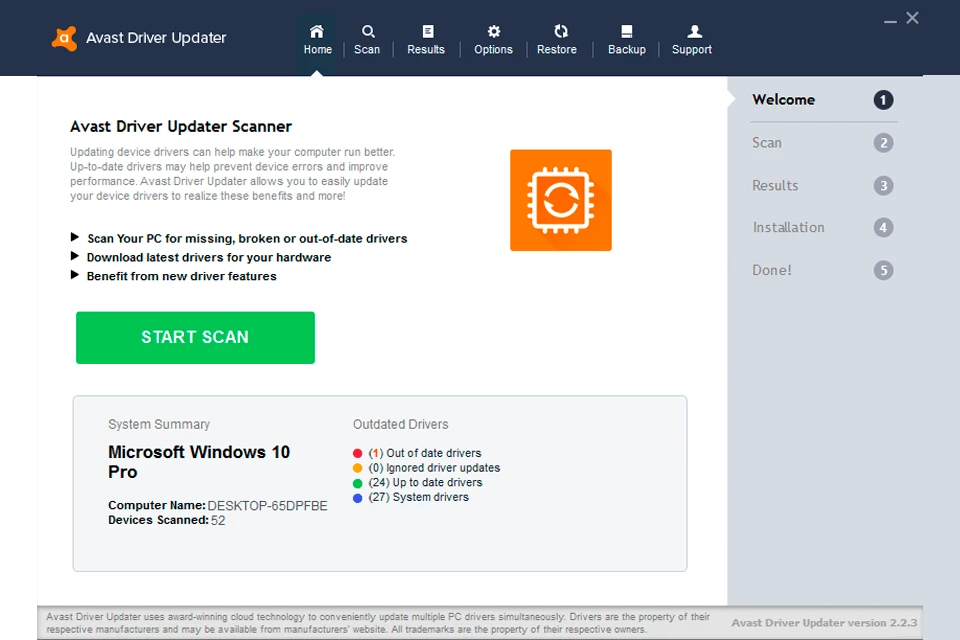
Hardware management often becomes a frustrating chore when a computer starts experiencing unexplainable audio drops, erratic mouse movements, or frequent network disconnects. Avast Driver Updater serves as a specialized maintenance utility designed to automate the often tedious process of managing PC hardware drivers. Instead of requiring users to manually hunt for updates across various manufacturer websites, this software scans the entire system to identify outdated, corrupt, or missing drivers that could be causing performance bottlenecks. By directly querying the native device manager, the application matches local hardware IDs against a massive database of verified original equipment manufacturer components, ensuring that every piece of connected hardware communicates correctly with the operating system.
Unlike browser-based scanning utilities that can only provide external download links, this dedicated desktop application handles the entire deployment sequence locally. Operating directly on the system drive allows the software to safely inject new driver files, create mandatory backup archives, and establish secure system restore points before any underlying modifications occur. This level of low-level system access is necessary for replacing critical display adapters, network cards, and chipset controllers without risking permanent system instability. Attempting to replace these files through a web browser would require users to manually unpack compressed archives and route them through complex configuration menus, increasing the likelihood of user error.
Users who want to maintain optimal hardware communication without navigating obscure device settings or deciphering cryptic component names rely on this utility to maintain system health. Whether configuring a newly built desktop computer or attempting to revitalize an aging laptop, establishing a baseline of up-to-date drivers prevents arbitrary software crashes and hardware malfunctions. The interface strips away the technical jargon typically associated with hardware management, presenting a clear list of obsolete components alongside a straightforward execution path for replacing them.
Key Features
- Automated Hardware Scanning: The application maps every connected internal and external peripheral by reading hardware IDs directly from the motherboard. It then cross-references these specific strings against an external database containing millions of verified vendor files. Instead of leaving users guessing which specific Realtek audio variant or Intel chipset model they have installed, the application isolates the exact match needed to ensure component stability.
- Pre-Installation Driver Backups: Modifying core system files always carries inherent risks, which is why the utility automatically creates a compressed copy of the existing driver before initiating any update. This archive is stored locally on the primary storage drive. By retaining the known-working state of the hardware configuration, the software provides a direct safety net if the newly downloaded package introduces unexpected hardware conflicts.
- One-Click Rollback Mechanism: If a user discovers that their microphone stopped working or their monitor resolution locked at a low setting after an update, they can immediately undo the change. The user interface includes a dedicated history and restoration tab where previous component states are logged. Clicking the revert button beside the problematic component uninstalls the faulty update and reinstates the original files without requiring the user to navigate the native Windows Device Manager.
- Threat Lab Malware Checks: Sourcing driver files from random third-party forums or unverified mirror sites often exposes computers to hidden malicious payloads. To mitigate this, every file downloaded through this application is routed through the vendor's internal security infrastructure. The files are checked against known threat signatures before they are allowed to execute on the local machine, preventing compromised binaries from gaining low-level system access.
- Sequential Installation Process: Attempting to update multiple core system components simultaneously can cause the operating system to freeze or crash during deployment. This utility employs a scaled, sequential installation queue that handles one driver payload at a time. It completely finishes injecting a graphics update and verifying its registry entries before it begins unpacking the files for a network adapter or Bluetooth receiver.
- Customizable Scan Schedules: Users do not need to manually trigger hardware audits to maintain component health. The application includes a scheduling interface where scans can be configured to run automatically during startup, or at specific weekly and monthly intervals. This background monitoring ensures that users are promptly notified via an interface alert as soon as a hardware vendor pushes a critical compatibility fix to the public database.
How to Install Avast Driver Updater on Windows
- Download the official executable installer package from the vendor's main software directory to your local storage drive.
- Locate the downloaded setup file in your system's download folder and double-click it to initiate the installation wizard.
- Review the end-user license agreement presented on the initial setup screen before clicking the button to proceed.
- Select your preferred installation directory, or leave the default system drive path unaltered to ensure proper integration with your operating system files.
- Wait while the setup wizard extracts the application binaries, configures the necessary background services, and creates desktop shortcuts.
- Launch the application from the newly created shortcut to open the main interface dashboard.
- Click the primary scan button to allow the utility to perform its initial hardware audit, which will catalog your current components and check for available updates.
Avast Driver Updater Free vs. Paid
The application operates on a freemium model that separates the diagnostic capabilities from the automated deployment tools. Users can install the software and utilize the scanning engine entirely for free. During this initial diagnostic phase, the application will audit the entire hardware configuration and display a detailed list of every component currently running an outdated driver. This provides immediate visibility into potential hardware bottlenecks, allowing users to verify if an update actually exists for their problematic graphics card or failing network adapter before committing to a purchase.
To unlock the ability to automatically download and install these identified updates through the application interface, users must purchase an annual subscription. This premium tier typically costs around $40 to $44 per year and grants the user an activation code valid for a single computer installation. The subscription covers the automated deployment engine, the pre-installation backup system, and real-time monitoring alerts. There is no perpetual license available, meaning the software will revert to the free diagnostic mode if the annual subscription lapses.
For users who want to evaluate the full automated workflow without immediate payment, the vendor frequently offers a time-restricted trial period. This trial unlocks the complete update engine, usually for 15 to 30 days, permitting the user to process necessary driver replacements and test the rollback mechanisms. Once the trial expires, the interface will lock the download buttons and prompt the user to input a valid commercial activation code to restore automated functionality.
Avast Driver Updater vs. Driver Booster vs. Snappy Driver Installer
IObit Driver Booster serves as a heavily utilized alternative, particularly among users focused on maximizing gaming performance. While both utilities handle basic hardware updates, Driver Booster actively searches for missing game redistributables and graphics engine components that are frequently required by modern game clients. Furthermore, Driver Booster typically offers multi-device licensing that covers up to five computers under a single subscription, making it a more economical choice for households with several machines. However, its interface contains numerous aggressive prompts for additional optimization utilities, which can distract users who only want to manage basic hardware updates.
Snappy Driver Installer takes an entirely different approach by catering specifically to IT technicians and system administrators. Unlike other options, it is completely free, open-source, and capable of operating offline. Users can download massive driver packs directly to a USB flash drive and deploy hardware updates to computers that lack an active internet connection. The trade-off for this flexibility is a highly technical and visually outdated interface that expects the user to understand exactly which driver packages should be forced onto a specific motherboard, making it largely unsuitable for average home users.
Avast Driver Updater remains the better fit for average desktop users who prioritize interface clarity and strict safety checks over complex configuration options. By strictly limiting its focus to verified driver replacements and avoiding unrelated system optimization gimmicks, the application maintains a clean, understandable dashboard. Its strict reliance on pre-installation backups and a highly visible rollback menu provides a critical safety net for users who are terrified of causing a permanent hardware conflict. It trades the advanced offline capabilities of Snappy and the gaming extras of Driver Booster for a streamlined, predictable maintenance experience.
Common Issues and Fixes
- Blue Screen of Death (BSOD) after updating a component. Occasionally, a newly deployed graphics or chipset driver will conflict with the operating system, causing a system crash. To resolve this, restart the computer in Safe Mode, open the application, navigate to the history tab, and use the rollback feature to restore the previous file.
- Audio stops working or network drops after an update. A mismatched audio or network adapter file can sever communication with the hardware. Open the main application dashboard, locate the specific component that is failing, and click the revert option to reinstall the previously working original manufacturer file.
- Activation code fails to register. Users often mistakenly attempt to enter a premium security suite code into the standalone driver utility. Ensure that the activation string specifically corresponds to a separate Driver Updater purchase, as bundle codes are often managed through a centralized account portal rather than direct entry in the app.
- Application consumes excessive resources on startup. By default, the software may attempt to run a full diagnostic audit every time the computer boots up, slowing down the desktop loading sequence. Open the application settings menu and change the automated schedule from daily startup to a weekly or monthly interval to reduce background processing.
- Hardware scans fail to connect to the database. If the application cannot verify the local hardware IDs against the external database, the update queue will stall. Check the local firewall configuration to ensure the application executable has outbound permission to reach the vendor's servers for catalog verification.
Version 26.1.6336.21016 — December 2025
- Expanded the driver database to include over 145 million drivers, ensuring broader hardware compatibility.
- Improved system stability with various under-the-hood optimizations and performance tweaks.
- Fixed minor bugs and scanning issues reported in previous beta versions.