Driver maintenance on Windows often involves navigating device manager trees, hunting down manufacturer support pages, and hoping the downloaded package matches the exact hardware revision of a motherboard. IObit Driver Booster Pro targets this administrative friction by automating the identification, download, and installation of hardware drivers. Instead of relying solely on standard Windows Update catalogs, which can lag behind manufacturer releases for discrete graphics cards or specialized peripherals, this utility queries a large external database to find specific component updates. It bridges the gap between basic built-in OS updates and the manual labor of tracking down individual installers for audio interfaces, network adapters, and chipset controllers.
The desktop application is built primarily for PC gamers, system builders, and users maintaining older hardware. Gamers use it to ensure they have the latest optimized display drivers and redistributables required by new software releases, which can affect frame rates and input latency. System builders use it to quickly populate a fresh OS install with necessary motherboard and peripheral instructions without needing the original installation discs or scouring multiple vendor domains. While basic browser-based driver scanners exist, a dedicated desktop client is necessary because it requires low-level system access to read exact hardware IDs, securely back up existing system states, and modify system files without triggering OS-level security blocks.
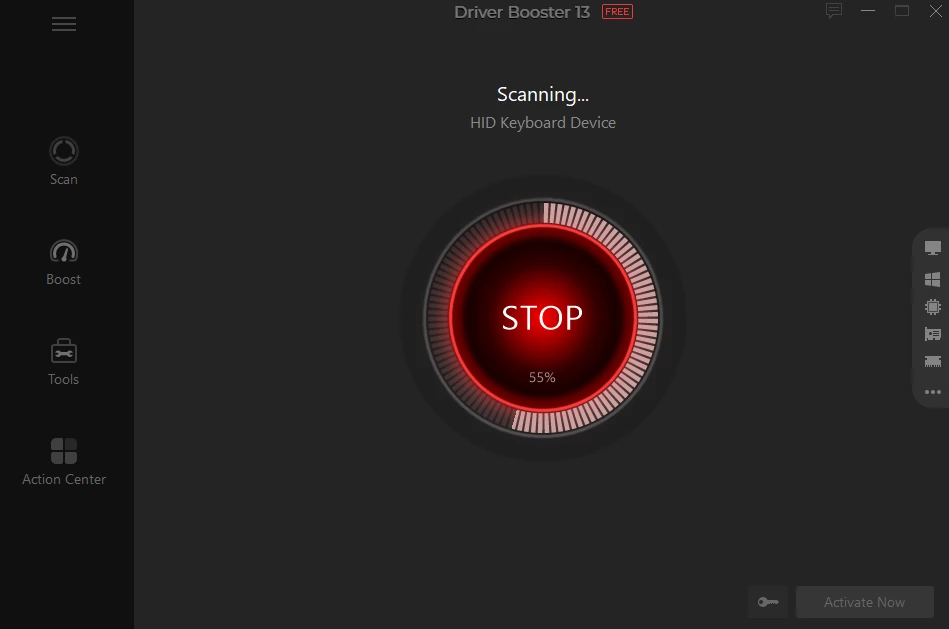
In practical terms, users launch the application, initiate a scan, and review a list of outdated components grouped by severity and category. The software displays the current installed date alongside the available new release, allowing users to select individual components or apply all updates simultaneously. Because modifying low-level instructions carries inherent system stability risks, the software automatically triggers system restore points before applying any changes to the active disk directory. This provides an immediate rollback path if a new display or audio driver introduces instability, hardware conflicts, or peripheral communication errors.
Key Features
- Feature Name: 18-Million Component Database
The software queries an extensive catalog containing over 18 million device drivers, including support for specialized hardware and recent ARM64 architecture processors. This repository ensures it can identify obscure webcams, legacy printers, and older motherboard chipsets that standard OS updates frequently miss. The database also categorizes gaming components, prioritizing redistributable packages like Microsoft Visual C++ and OpenAL, which prevents games from failing to launch due to missing library files. - Feature Name: Automatic Idle Downloads
To prevent network congestion during active work or gaming sessions, the application can schedule driver downloads and installations exclusively for when the system is idle. Users can configure this behavior in the settings menu, ensuring the machine remains updated without interrupting foreground tasks or consuming active bandwidth. This background processing requires the paid tier to function. - Feature Name: Automated Rollback and Backup
Modifying system files inherently risks breaking hardware functionality. Before executing any installation, the utility automatically archives the existing driver package and forces Windows to create a standard System Restore point. If an update causes a blue screen or peripheral failure, users can boot into Safe Mode and revert the changes entirely using the built-in Rescue Center. - Feature Name: Built-in Hot Fix Tools
The interface includes a dedicated "Tools" tab housing specific troubleshooting utilities for common hardware failures. Users can click "Fix No Sound," "Fix Network Failure," or "Fix Bad Resolution" to force the software to clear out corrupted temporary files and reinstall default device instructions. This provides a fast diagnostic step before manually tearing down hardware configurations. - Feature Name: Offline Driver Updater
When a computer lacks network access—often due to a missing Ethernet or Wi-Fi adapter driver after a clean OS installation—this feature exports the system's hardware profile to a text file. Users can transfer this file via USB to a connected machine, where the utility will parse the profile, download the exact offline packages needed, and export them back to the USB drive for the offline PC. - Feature Name: Game Boost RAM Optimizer
Beyond hardware updates, the utility includes a dedicated module for resource management prior to launching resource-heavy applications. Activating Game Boost temporarily suspends non-essential background services, scheduled tasks, and secondary applications to free up system memory and CPU cycles. Users can toggle this mode manually or configure it to trigger when a full-screen 3D application launches.
How to Install IObit Driver Booster Pro on Windows
- Download the official Windows installer executable from the developer's website or an authorized distributor.
- Launch the downloaded setup file to initialize the installation wizard, which requires standard administrator privileges.
- Review the initial setup screen carefully, as the installer frequently includes optional checkboxes for secondary company products like iTop VPN or Advanced SystemCare. Uncheck these boxes if you only want the driver utility.
- Select the installation path. The utility defaults to the standard Program Files directory, which is recommended for proper system access and background service execution.
- Click the "Install" button and wait for the application to extract its core files, which typically takes less than a minute on modern solid-state drives.
- Upon completion, the installer will present an option to subscribe to the vendor's newsletter; you can skip this step and click "Finish" to close the wizard.
- On first launch, the application will immediately begin scanning your hardware profile against its cloud database to generate an initial report of outdated components.
- Restart the computer if the initial driver installations prompt for a system reboot to finalize registry changes.
IObit Driver Booster Pro Free vs. Paid
The developer operates on a freemium model, offering a restricted basic tier alongside the fully unlocked paid tier. The Free version allows users to scan their systems and identify outdated components without a time limit. However, it restricts download speeds and requires users to manually click through and install updates one by one. The database available to free users is also smaller, meaning it might overlook obscure hardware or specific gaming optimizations that the premium version would catch. The free version also serves as a cross-promotional tool for other IObit utilities.
Upgrading to the Pro tier—which typically costs $22.95 for a one-year license covering up to three PCs—unlocks the complete feature set. This includes access to the full 18-million component database, uncapped download speeds, and the ability to update all outdated hardware simultaneously with a single click. The paid tier is also required to utilize the automatic idle download scheduling and the automated backup features, which are critical for maintaining system stability during mass updates.
Additionally, the Pro version includes priority updates for gaming-related components and deeper support for fixing persistent hardware errors. If you manage multiple machines or frequently reinstall operating systems, the automated backup and uncapped speeds of the paid license save manual effort. For users who only need to fix a single audio or network issue once, the free tier may suffice, provided they are willing to navigate slower downloads and manual installation prompts.
IObit Driver Booster Pro vs. Snappy Driver Installer vs. Driver Easy
Snappy Driver Installer serves a completely different audience, focusing on open-source distribution and offline functionality. It allows users to download entire multi-gigabyte driver packs via BitTorrent, meaning you can carry a definitive archive of all known PC drivers on a single USB stick for offline repairs. However, its interface is strictly utilitarian and complex, lacking the polished, one-click troubleshooting tools found in commercial software. IT professionals repairing offline machines often prefer Snappy Driver Installer, but average desktop users may find its visual layout confusing.
Driver Easy operates on a very similar freemium model to IObit, focusing on scanning individual hardware IDs and finding exact matches. The main difference lies in the strict restrictions applied to Driver Easy's free tier, which throttles download speeds to mere kilobytes per second and forces users to manually extract and install the packages through the Windows Device Manager. While Driver Easy provides accurate hardware matching, its strict free-tier limitations make it frustrating to use without paying for the premium upgrade.
IObit Driver Booster Pro strikes a balance between automated ease of use and broad hardware support. It is the better fit for gamers and general desktop users who want automated background updates, easy-to-read hardware reports, and one-click rollback options without digging into the Device Manager. While it requires a paid license to unlock its best features, the included automated restore points and built-in hot fix tools make it far more accessible than open-source alternatives, and its pricing is generally competitive when covering multiple household PCs.
Common Issues and Fixes
- Problem description. The system crashes or experiences a Blue Screen of Death (BSOD) after applying a bulk update. Bulk updating modifies multiple low-level system files simultaneously, which can occasionally trigger conflicts. Boot the computer into Windows Safe Mode, launch the application, and navigate to the Rescue Center to restore the system state to the automatically generated backup created prior to the update.
- Problem description. The computer loses internet connectivity immediately after a network adapter update. The newly installed LAN or Wi-Fi package may be incompatible with your specific router or motherboard revision. Open the application, navigate to the Tools tab, and select "Fix Network Failure" to clear the corrupted settings, or use the Rescue Center to roll back to the previous functional network adapter instructions.
- Problem description. Unwanted secondary applications appear on the desktop after initial installation. The official installer frequently bundles promotional software, such as system cleaners or VPNs, which install alongside the main utility if not explicitly declined. Open the standard Windows "Add or Remove Programs" menu, locate the secondary applications, and uninstall them; in the future, carefully uncheck promotional offers during the initial setup wizard.
- Problem description. Audio output stops working or produces static after applying a sound card update. Windows often struggles to route audio correctly when multiple sound controllers receive updates simultaneously. Use the "Fix No Sound" utility located in the Tools tab to reset the Windows audio endpoint builder, or right-click the speaker icon in the Windows taskbar to manually select the correct default playback device.
Version 13.2.0.184 — January 2026
- Expanded hardware database to support new devices, including AMD Radeon AI PRO R9600D and R9700S.
- Improved performance and stability for recent games such as Counter-Strike 2, Assassin's Creed Valhalla, and Dying Light: The Beast.
- Enhanced support for AI-related drivers to optimize artificial intelligence processing tasks.
- Fixed known bugs and minor issues to ensure a smoother user experience.