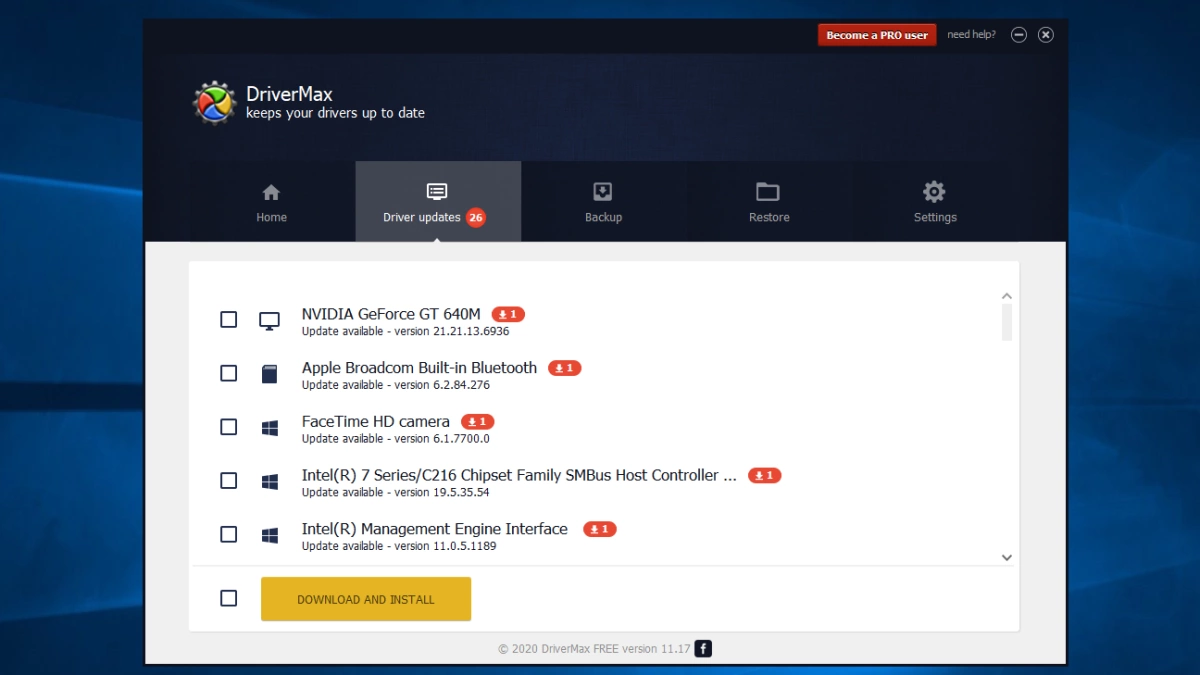
Hardware drivers are the essential communication bridges between the physical components of a computer and the operating system. When these files become outdated, corrupted, or missing, users experience peripheral disconnects, poor display resolution, stuttering audio, and degraded network speeds. DriverMax Pro automates the often tedious and error-prone process of identifying, downloading, and installing these critical hardware instructions. Rather than forcing users to manually open the Windows Device Manager, copy hardware ID strings, and search through obscure manufacturer support pages, this desktop utility scans the local registry and cross-references it against an external database of over two million verified device configurations. System builders, IT helpdesk technicians, and home users rely on this client to maintain hardware stability, particularly when trying to revive legacy motherboards or configure new gaming peripherals. A native desktop application is required for this level of maintenance because web browsers are intentionally restricted from modifying low-level system files or writing directly to the protected directories where these hardware instructions reside.
The utility distinguishes itself by prioritizing system safety and structured workflows over blind updates. Hardware updates carry inherent risks; a poorly coded graphics driver can easily cause screen flickering, while an incorrect chipset file might trigger boot failures. To mitigate these risks, the application enforces strict safety protocols before altering any system configurations. It automatically generates a secure system restore point prior to installation, ensuring that users have an immediate fallback option if a new file introduces instability. Beyond basic restore points, the software allows users to actively back up their entire current driver configuration into a single, compressed archive. This feature fundamentally improves the process of reinstalling an operating system. Instead of spending hours hunting down individual setup files for obscure sound cards and Wi-Fi adapters after a clean installation, users simply import their backup archive, and the software automatically reinstalls the entire hardware profile in minutes.
Furthermore, the software addresses one of the most frustrating paradoxes in computer maintenance: needing the internet to download a network driver, but needing a network driver to access the internet. By utilizing an offline identification protocol, the application allows users to analyze an offline machine, export its hardware requirements to a USB flash drive, and download the exact necessary files using a secondary, connected computer. This offline bridge, combined with the ability to handle simultaneous multi-threaded downloads, makes the software highly efficient for batch processing. Users are not subjected to endless manual clicking through separate manufacturer setup wizards. The client intercepts the downloaded files and executes the installations silently in the background, streamlining the process of bringing a neglected machine up to optimal performance standards.
Key Features
- Driver Backup and Archive Creation: The utility provides a dedicated export tool that compiles all currently active hardware drivers into a single compressed ZIP folder or a standalone executable archive. This is heavily utilized by technicians preparing to format a hard drive, as it guarantees they retain the exact working configurations for legacy motherboards or obscure capture cards that no longer have active manufacturer support pages.
- Automated Restore Point Generation: Before the software commits any new files to the system directory or modifies registry keys, it communicates with the operating system to create a mandatory system restore point. If a recently updated graphics card driver causes visual artifacts or system stuttering, the user can instantly revert the entire machine back to its exact pre-update state without losing personal data.
- Offline Hardware Identification: When dealing with a computer completely cut off from the internet due to missing ethernet or Wi-Fi configurations, the client generates a local hardware profile export. Users can transfer this specific profile via a USB thumb drive to any connected machine, allowing the software to fetch the correct network files needed to bring the original computer online.
- Scheduled Background Scanning: Within the settings menu, users can configure automated hardware checks on a daily, weekly, or monthly schedule. The application runs silently in the system tray, scanning components during idle periods and generating notifications only when verified updates are ready, thereby eliminating the need for manual maintenance checks.
- Direct Driver Rollback Protocol: Because Windows locally caches previous versions of installed hardware files, the software includes a direct rollback interface. If an update breaks peripheral functionality, users can open the "Restore drivers" tab, select the malfunctioning device, and instruct the client to strip away the new file and immediately reinstate the older, stable version.
- Simultaneous Multi-Threaded Downloads: Unlike basic maintenance tools that force users to wait for files to process sequentially, the client engine handles multiple data streams at once. It pulls necessary setup files from the external servers in parallel, drastically cutting down the waiting time when updating an entire motherboard chipset, audio interface, and networking stack simultaneously.
- Detailed Hardware Reporting: For users managing multiple machines, the software generates highly specific text or HTML reports detailing every installed component, current version number, and release date. This reporting function allows IT administrators to audit hardware configurations across an office network and ensure all workstations are running identical, verified driver files.
How to Install DriverMax Pro on Windows
- Download the executable Windows installer package directly from the official developer website to ensure you receive the safest, unmodified setup file.
- Locate the downloaded setup executable in your default downloads folder and double-click it to launch the installation wizard.
- When the Windows User Account Control dialogue box appears on your screen, click "Yes" to grant the installer the necessary administrative privileges required to write to system directories.
- Read through the end-user license agreement and carefully inspect the subsequent screens; the installer occasionally presents optional third-party software offers or toolbars which you must manually decline by unchecking the provided boxes.
- Choose the destination folder for the application, or leave the default path set to your primary local drive within the standard program files directory.
- Allow the setup wizard a few moments to extract the core application files, register the necessary background services, and create executable shortcuts on your desktop and start menu.
- Click "Finish" to close the wizard and launch the application for the first time, at which point you will be prompted to create a free user account or log in with existing credentials to authenticate your connection to the database.
- Initiate the primary hardware scan from the main dashboard, allowing the application to read your motherboard components, connected peripherals, and registry keys to generate your first complete update report.
DriverMax Pro Free vs. Paid
DriverMax Pro operates on a distinctly tiered freemium model, offering a permanently free version alongside various paid subscription options designed for advanced users. The free edition allows anyone to install the software, scan their entire hardware configuration, and view detailed reports highlighting exactly which devices are running outdated files. However, the developer enforces strict utility limitations on this free tier to encourage upgrades. Free users are restricted to processing a maximum of two individual driver downloads per day, and no more than ten total downloads within a single month. Furthermore, the free version restricts server bandwidth, resulting in significantly slower download speeds, and forces users to manually execute each individual manufacturer setup wizard.
While the free tier is perfectly adequate for someone who simply needs to fix a single disconnected printer or update a specific audio interface, it becomes highly restrictive when configuring a newly built computer. Upgrading to the Pro tier fundamentally changes the workflow by removing all arbitrary download caps and speed throttles. Paid users gain access to unrestricted, simultaneous file downloads, allowing them to pull dozens of updates in parallel. More importantly, the Pro tier unlocks the automated background installation engine. Instead of clicking through twenty different setup screens, a Pro user can select all outdated devices, click a single button, and let the software silently apply every update without any manual intervention.
The pricing structure for the Pro tier is highly flexible, avoiding the trap of forcing users into a single expensive annual plan. The developer typically offers short-term access, such as a thirty-day pass for around three dollars, which is ideal for a user who only needs premium features temporarily to set up a new rig. For ongoing maintenance, one-year and two-year subscriptions are available, frequently discounted to average between ten and fifteen dollars annually. This makes it highly accessible for home users who want to keep their gaming rigs or home office machines permanently optimized.
For users who despise recurring subscription fees, the developer also provides a perpetual lifetime license option. Usually priced between thirty and forty dollars during promotional periods, this lifetime tier grants permanent access to the Pro features, software upgrades, and the continually expanding hardware database. Because a single account can often be used to manage multiple computers within a single household, the lifetime license provides substantial long-term value for PC enthusiasts who frequently rebuild their machines or manage laptops for their entire family.
DriverMax Pro vs. Driver Booster vs. Driver Easy
Driver Booster approaches hardware maintenance from an aggressive, gaming-oriented perspective, making it a highly specialized alternative. It features an absolutely massive hardware database and deliberately scans for missing gaming components, such as outdated C++ Redistributables, DirectX libraries, and specific graphics rendering files. Users should choose Driver Booster if their primary motivation is maximizing gaming frame rates and they want an application that actively tweaks system settings for optimal performance. However, this aggressive approach comes with drawbacks; Driver Booster can feel bloated, often pushing secondary optimization tools, VPN offers, and marketing pop-ups that distract from the core task of managing essential hardware files.
Driver Easy takes a highly minimalist and interface-driven approach to system updates. It focuses heavily on visual clarity, making it exceptionally easy for non-technical users to identify unknown devices and understand their hardware tree. The free version of Driver Easy strictly separates the scanning process from the installation process, forcing users to manually open system folders and update files through the standard Windows interface. While this is educational, it is also highly tedious for large batches. Users should opt for Driver Easy if they want a clean, visually pristine application and prefer manually verifying every single file placement over relying on automated background installations.
DriverMax Pro fits perfectly between these two extremes, offering the most practical utility for technicians and users focused on backup workflows rather than gaming tweaks or minimalist interfaces. Its definitive advantage lies in its comprehensive export and import capabilities. IT professionals and system builders benefit heavily from the ability to compress an entire machine's driver profile into a single standalone archive before formatting a hard drive. When dealing with completely offline computers, obscure legacy motherboards, or custom-built audio workstations, this utility provides the safest, most structured toolkit for ensuring the hardware configuration survives a clean operating system installation without relying on secondary optimization tools.
Common Issues and Fixes
- Problem description. The application fails to connect to the database and displays Error 5321. This network timeout error occurs when the client cannot reach the external servers to verify your hardware profile. To resolve this, disable any active VPN connections or proxy servers in your Windows network settings, and ensure your third-party firewall is configured to allow the application's executable file outbound internet access.
- Problem description. The computer loses audio output or visual stability immediately after an update. Occasionally, a hardware manufacturer will release an unstable instruction file that conflicts with your specific motherboard configuration. Restart your computer, open the application, and navigate to the "Restore drivers" menu to utilize the rollback feature, which strips away the problematic file and reinstates the previous working version.
- Problem description. A newly installed operating system cannot connect to the internet to download updates. The software cannot fetch files from the server without an active network connection. Utilize the offline scan functionality to export your hardware identification list to a USB thumb drive, plug that drive into a secondary computer with internet access, and use the client there to download the specific ethernet or Wi-Fi files.
- Problem description. Antivirus software intercepts the installation and flags the setup file as a potentially unwanted program. This flag is usually triggered because the standard installation wizard sometimes includes optional, bundled third-party software offers. To prevent this, carefully read each step of the setup wizard and manually uncheck any boxes offering browser toolbars or secondary optimization utilities, ensuring only the core application installs.
- Problem description. The free version refuses to download any more files despite showing outdated hardware. The free tier strictly enforces a hard limit of two file downloads per day and ten total downloads per month. To bypass this restriction, you must either wait twenty-four hours for your daily limit to reset, prioritize only the most critical hardware updates, or upgrade your account to a paid Pro tier to unlock unrestricted bandwidth.
Version 16.22.0.25 — October 2025
- Added a new "System Components" category to help organize specific driver types more effectively.
- Improved performance of the driver backup and restore module for safer system recovery.
- Fixed issue where certain hardware components were not correctly identified during scans.
- Updated the internal driver database to support the latest Windows 11 hardware configurations.
- Enhanced interface responsiveness and navigation speed for a smoother user experience.