Maintaining system hardware compatibility often requires navigating a maze of manufacturer websites, extracting compressed archive files, and manually forcing installations through the native Windows Device Manager. Auslogics Driver Updater replaces this tedious manual workflow by acting as a dedicated, automated matching engine for your local hardware components. The application scans the physical system architecture to identify exactly which motherboards, graphics cards, sound processors, and network adapters are currently connected to the machine. It then compares the local instructional files against a cloud database of manufacturer-approved releases to pinpoint missing, corrupted, or outdated components, completely bypassing the need for manual file hunting.
This software targets general computer users, system administrators, and PC gamers who frequently encounter hardware-related system instability. Outdated instructional files are a primary cause of hardware conflicts, resulting in peripheral disconnections, audio stuttering, dropped wireless signals, and catastrophic system crashes such as the Blue Screen of Death. Instead of diagnosing these faults manually by decoding error logs, users rely on this desktop utility to automate the identification and patching process. A localized desktop application is necessary for this task because hardware polling requires direct communication with the operating system kernel and system registry, a level of low-level access that browser-based diagnostic tools simply cannot achieve.
By utilizing a dedicated client, administrators ensure that the specific firmware and software instructions bridging their operating system and physical hardware remain strictly current. The application reads hardware ID strings directly from the motherboard, ensuring that a customized laptop audio chipset receives the exact manufacturer package rather than a generic substitute that might disable secondary hardware features. This precise matching process eliminates the common risk of downloading incorrect packages from unverified third-party repositories, ensuring that critical system infrastructure remains stable, responsive, and secure during routine maintenance operations.
Key Features
- Automatic Hardware Diagnostics: The software maps the entire hardware profile of the host machine, reading specific hardware IDs, vendor IDs, and subsystem identifiers from the system registry. This prevents the installation of incompatible files, ensuring that specialized components like integrated fingerprint readers, proprietary laptop touchpads, or custom cooling controllers receive the exact instructional files required by the original equipment manufacturer.
- Driver Backup and Restore: Before any system modification occurs, the application creates a compressed archive of the existing hardware configuration. If a newly installed package causes audio latency, screen flickering on a display adapter, or network drops, users can navigate to the Restore tab and revert the specific component to its previous working state without relying on the broader native Windows System Restore tool.
- One-Click Bulk Execution: The utility allows users to process dozens of pending hardware updates simultaneously rather than clicking through individual property windows in the native Device Manager. The application queues the downloads, unpacks the installer files, and executes the necessary setup parameters sequentially in the background without requiring continuous manual intervention from the operator.
- Hardware Exclusion Lists: Certain customized setups, such as professional audio mixing interfaces or legacy document scanners, require specific older variants to maintain specific functionalities. Users can right-click any hardware component in the active scan results and assign it to an ignore list, ensuring the matching engine skips this specific physical device during all future diagnostic sweeps.
- Scheduled Background Scans: Administrators can configure the application to run silent diagnostic checks on a daily, weekly, or monthly schedule through a dedicated settings panel. This automation ensures that critical components, such as dedicated graphics processing units or gigabit network adapters, receive the latest manufacturer performance patches as soon as they are published to the remote database.
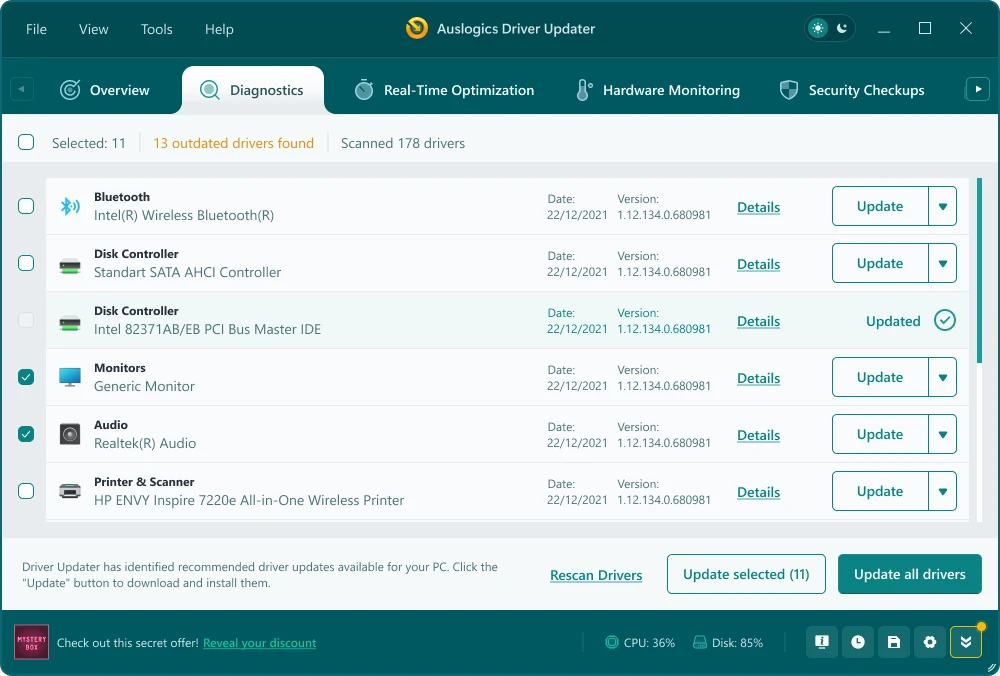
- Detailed Version Comparison: The primary scan results interface presents a direct, side-by-side comparison between the currently installed file and the available remote update. It displays the exact version numbers, publication dates, and manufacturer signatures, giving system administrators the exact technical data needed to verify the necessity of the proposed system modification before approving the download.
How to Install Auslogics Driver Updater on Windows
- Download the executable installer package directly from the official publisher website or a verified software directory to ensure file integrity.
- Locate the downloaded executable file in your local storage directory and double-click it to initiate the primary setup wizard.
- Grant the installer administrative privileges when prompted by the Windows User Account Control dialog, as hardware modifications require elevated system access to write to protected directories.
- Select your preferred interface language from the initial dropdown menu and specify the local directory path for the program files, or accept the default system drive location for standard operation.
- Review the installation steps carefully, unchecking any pre-selected boxes for optional promotional software or bundled optimization tools if you only require the standalone hardware matching utility.
- Click the install button to extract the core application files, build the local hardware matching database, and write the necessary executable shortcuts to the Start menu and desktop.
- Launch the application from the newly created shortcut; upon the first initialization, the software will automatically begin a preliminary diagnostic scan to map your current motherboards, USB hubs, peripherals, and display adapters.
Auslogics Driver Updater Free vs. Paid
The application operates on a freemium licensing model, explicitly dividing its capabilities between a restricted diagnostic tier and a fully automated premium tier. The free version allows users to scan their entire hardware configuration, identify missing or outdated components, and view the exact version numbers of the available manufacturer patches. However, the free tier heavily restricts the actual installation process. Users operating on the free tier must manually click and process each file update individually, which requires active monitoring, repetitive manual input, and individual download confirmations.
The Pro version, which currently costs $39.95 for an annual subscription covering up to three distinct computers, completely removes these manual execution restrictions. Upgrading to the premium tier unlocks the bulk execution functionality, allowing users to queue all pending patches and install them simultaneously with a single command. This transition shifts the software from a strict manual diagnostic tool into a fully automated, unattended maintenance utility suitable for rapid deployment.
In addition to bulk processing, the paid subscription activates automated background scheduling and grants access to priority technical support from the publisher. The premium tier also enforces mandatory automatic system backups prior to any bulk operations, ensuring that a safe rollback point exists before the software modifies multiple critical system files at once. The free version remains functional indefinitely for basic diagnostics, but the time saved by the automated bulk processing is the primary functional incentive for the commercial upgrade.
Auslogics Driver Updater vs. Driver Booster vs. Snappy Driver Installer
Driver Booster caters heavily to the PC gaming demographic by bundling its core update engine with aggressive system tweaking tools, background RAM cleaners, and game-centric performance profiles. It maintains an exceptionally large database and prioritizes game-ready graphics patches and high-polling peripheral support. However, its interface frequently includes prominent cross-promotional banners for other optimization tools produced by its parent company. Users who strictly want a quiet, focused maintenance utility without the gaming-oriented additions often find Driver Booster's interface overly cluttered compared to more single-purpose applications.
Snappy Driver Installer serves an entirely different workflow, targeting IT professionals and bench technicians who repair offline machines. It is a strictly open-source project that allows users to download massive offline driver packs, sometimes exceeding 20GB in total size, to a portable USB drive via peer-to-peer torrents. This allows technicians to install missing network or display files on newly built computers that have zero active internet connectivity. While incredibly useful for offline repair scenarios, Snappy Driver Installer features a highly technical, utilitarian interface that can easily overwhelm standard home users who simply want to fix a single missing audio component.
Auslogics Driver Updater occupies the middle ground, offering a much cleaner and more focused user experience than open-source alternatives while avoiding the aggressive gaming-focused cross-promotions of its commercial rivals. It is the better fit for standard home and office users who require a straightforward interface, reliable automated backups, and a clear presentation of hardware version data. It sacrifices offline repair capabilities in favor of a streamlined, cloud-connected matching engine that anyone can operate safely without formal technical training.
Common Issues and Fixes
- System audio or network connection drops after an update. Occasionally, a newly published manufacturer file will conflict with older physical hardware revisions. Open the application, navigate to the Restore tab, select the malfunctioning hardware component, and initiate a rollback to the previous working configuration to immediately resolve the conflict.
- The utility continuously flags custom hardware as outdated. Highly specialized equipment, such as professional mixing consoles or heavily modified peripheral controllers, often require older software to maintain specific custom features. Right-click the affected device in the primary scan results screen and add it to the exclusion list so the engine permanently ignores it during future operations.
- Diagnostic scans freeze or take an unusually long time to complete. This behavior typically occurs when aggressive third-party antivirus software intercepts the deep hardware polling process. Temporarily whitelist the updater executable within your security software settings, or run the application explicitly as an Administrator to ensure it has uninterrupted access to the operating system's hardware management layer.
- The interface blocks bulk operations and prompts for payment. The free tier limits users to processing modifications one physical component at a time. To proceed without purchasing a commercial subscription license, dismiss the payment prompt and manually click the individual update button located next to each specific hardware item in the list, allowing the active download to finish before starting the next one.
Version 2.1.0.0 — December 2025
- Enhanced the driver scanning engine to detect outdated software more accurately.
- Expanded the internal database to support a wider range of devices and manufacturers.
- Improved stability and applied general performance optimizations.
- Updated multiple interface languages for better localization.
- Fixed various minor bugs and visual glitches within the user interface.