Digital photography allows users to capture thousands of moments, but this convenience often leads to disorganized hard drives filled with redundant copies and slightly modified edits. Awesome Duplicate Photo Finder serves as a specialized desktop utility designed to tackle this digital clutter by identifying and removing unnecessary image files. Unlike generic file cleaners that only look for identical file names, exact byte sizes, or identical hash values, this software employs visual comparison algorithms to detect both exact duplicates and similar images. This allows the tool to identify matching content even if one file is a compressed web export and the other is the original high-resolution master, helping users reclaim valuable disk space on local storage hardware.
Many photographers, graphic designers, and casual users end up with multiple versions of the same picture after resizing, exporting, applying basic color corrections, or backing up folders across multiple drives. A browser-based duplicate cleaner or a cloud-only file management system struggles with these local workflows because uploading gigabytes of high-resolution images or camera RAW files to a remote server is impractical and wastes bandwidth. By operating entirely as a local desktop application, Awesome Duplicate Photo Finder analyzes the raw pixel data directly on the physical hard drive, keeping personal photos private and bypassing the need for an active internet connection or a registered cloud account.
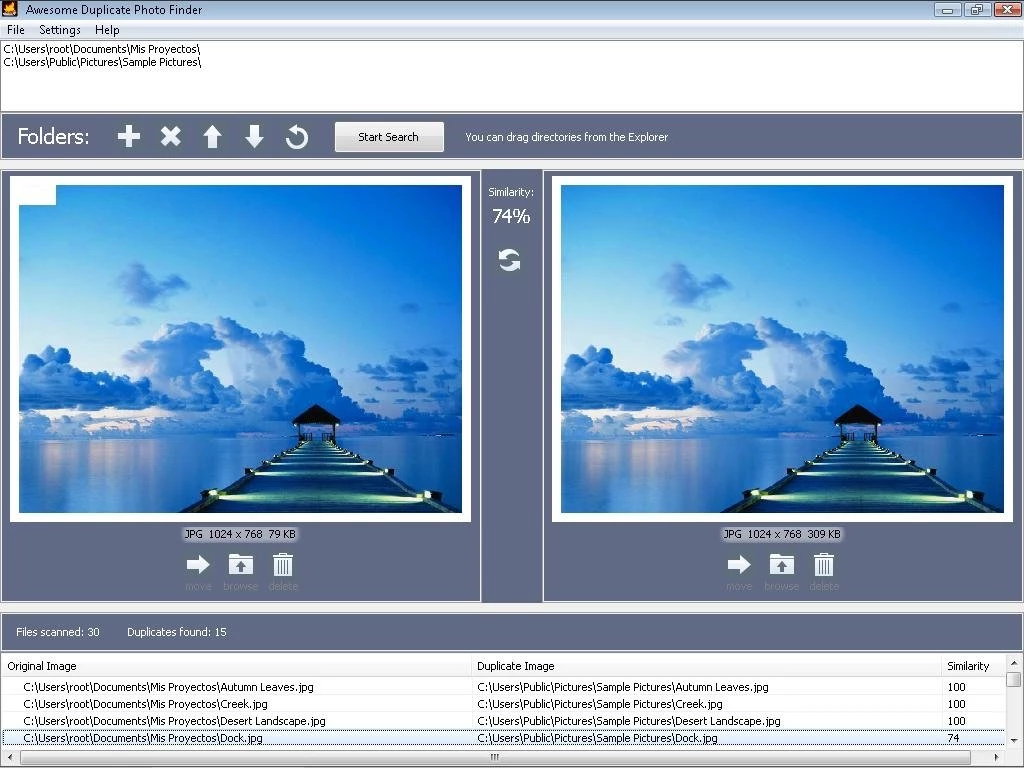
This tool is specifically built for manual, visual inspection rather than blind, automated mass deletion. It displays matched pairs side-by-side on the screen, giving the user the final say over which file to keep and which to discard. This conservative workflow suits individuals who want complete manual control over their file systems, allowing them to verify similarity scores and visually confirm the differences before taking permanent action. Rather than trusting an invisible algorithm to clean out a digital archive automatically, the user remains the final judge of what constitutes a redundant file.
Key Features
- Visual Similarity Matching Algorithm: The software analyzes the actual pixel content of your images rather than relying exclusively on file metadata, timestamps, or file names. It successfully detects pictures that have been resized for email, rotated slightly, or subjected to minor color corrections such as contrast adjustments or black-and-white filters. This ensures that different edits of the exact same subject are still flagged for review.
- Side-by-Side Interface Preview: When the directory scan finishes, the main interface displays the matching files next to each other in a dedicated viewing pane. A percentage score sits directly between the two visual previews, indicating exactly how closely the visual contents match based on the algorithm's analysis. This visual layout means users do not need to open a separate external image viewer to check the files.
- Broad Image Format Support: The scanning engine processes standard compressed web formats alongside uncompressed graphical files. It handles JPG, BMP, GIF, PNG, and TIFF formats, as well as CR2 RAW files generated by Canon digital cameras. This broad compatibility allows amateur photographers to clean up mixed directories containing both raw outputs and finished social media exports.
- Drag-and-Drop Directory Selection: Users can quickly add target paths by dragging folders directly from Windows Explorer and dropping them into the application window at the top of the screen. This eliminates the need to navigate through complex nested directory trees or hidden folder menus just to queue up a basic scan, speeding up the initial setup phase.
- Direct File Action Controls: Action buttons located beneath the dual image previews allow users to manage the redundant files immediately from the results page. You can send the chosen duplicate directly to the Windows Recycle Bin, move the file to a different archive directory, or open its original folder path to inspect the surrounding files before making a decision.
- Network and Removable Drive Compatibility: The application does not restrict its scanning engine to the primary local system drive. Users can target external USB flash drives, backup drives, and mapped network locations. This makes it possible to clean up external storage devices used specifically for archival photography storage.
- Subdirectory Scanning Toggle: A dedicated checkbox gives users the explicit option to include or exclude nested subfolders from the search logic. Toggling this off restricts the scan strictly to the top-level directory, which significantly speeds up the processing time when you are targeting a specific folder and want to ignore archived subfolders entirely.
How to Install Awesome Duplicate Photo Finder on Windows
- Download the standard Windows executable installer package directly from the official developer site or a verified software directory.
- Locate the downloaded installation file in your default downloads folder and double-click the executable to launch the setup wizard.
- Review the software license agreement on the first screen and click the button to accept the terms before proceeding to the next step.
- Choose the destination folder on your local drive. The installer defaults to the standard Program Files directory, which is optimal for a typical Windows environment, but you can assign it to a custom secondary drive if needed.
- Select whether you want the setup tool to create a desktop shortcut and a Start menu folder entry for faster access upon completion.
- Click the install button to extract the necessary application files, comparison algorithms, and executable data to your selected directory path.
- Once the extraction finishes, ensure the option to run the program is checked, then close the setup wizard. The application will open immediately to a blank main window where you can drag and drop your first folder.
Awesome Duplicate Photo Finder Free vs. Paid
Awesome Duplicate Photo Finder operates entirely under a freeware model, meaning the software is completely free to acquire, install, and use for personal or commercial projects. The developer does not lock any visual comparison features behind a paywall, nor are there any artificial limitations on the number of files you can scan, the number of directories you can process at once, or the size of the storage drives you target.
Because there is no premium, pro, or enterprise tier available, users have immediate access to the full scanning engine, the CR2 RAW file support, and the side-by-side preview tools right after standard installation. The interface does not contain embedded advertisements, and the installer does not bundle third-party spyware, browser hijackers, or promotional toolbars.
The continued development and hosting of the project are sustained by optional user donations rather than recurring software subscriptions, one-time perpetual license fees, or mandatory account registrations. Users who find the utility helpful for cleaning up large photo libraries can choose to support the developer via a direct donation link located on the official website. However, participating in this donation system is strictly voluntary, and ignoring it does not change the behavior, speed, or functionality of the installed application in any way.
Awesome Duplicate Photo Finder vs. VisiPics vs. dupeGuru
VisiPics caters to users who need to process massive directories and manage multiple duplicate copies simultaneously, as it can group several similar photos together in a single batch rather than just forming isolated pairs. It includes adjustable similarity filters controlled by a slider, and an auto-select feature that automatically flags the lowest-resolution or smallest-file-size copies for mass deletion. This automated flagging makes VisiPics a faster choice for individuals clearing out thousands of redundant files across an entire hard drive in a single sitting.
dupeGuru is an open-source alternative that provides extensive customization, relying on a modular scanning engine that can analyze pictures, music, and documents using metadata rules alongside visual checks. It allows strict technical configuration, giving advanced users the ability to define custom reference folders where original master files are kept safely isolated, ensuring the program only flags and deletes matches found in external, unprotected directories.
Awesome Duplicate Photo Finder is the better fit for users who want to avoid complex configuration screens, intricate sliders, and complex folder rules, preferring instead to manually verify every single match. Because it forces the user to review paired files side-by-side with a clear similarity percentage, it heavily reduces the risk of accidentally deleting a preferred edit or a slightly different burst-shot frame. This manual, cautious workflow makes it ideal for careful, small-to-medium batch cleanups where preserving specific photographic memories takes priority over automated speed.
Common Issues and Fixes
- The scan takes a very long time or causes the application to consume all available system memory. This issue commonly happens when pointing the software at a massive hard drive containing tens of thousands of high-resolution files or camera RAW formats. The visual comparison algorithm is demanding. The fix is to scan smaller, specific folder batches sequentially instead of attempting to scan an entire multi-terabyte root drive in one session.
- Nested duplicate files hidden deep in external folders are ignored during the search process. By default, the software might only look at the top level of the selected directory to save processing time. To fix this, ensure the "Scan Subdirectories" checkbox in the main interface is explicitly marked before clicking the start button, forcing the engine to dig into nested folders.
- Deleting a file removes it entirely from the system instead of sending it to the Recycle Bin. This occurs if local Windows configuration settings are configured to bypass the trash folder for files stored on external drives or network attached storage. To fix this, verify your Windows Recycle Bin properties are set to catch deleted files on that specific drive letter, or use the application's "Move" function to isolate duplicates in a designated temporary folder for safe manual review.
- The software flags completely different photos as visually similar duplicates. This occurs because the visual comparison algorithm is occasionally tricked by images with identical, large uniform backgrounds, such as a product shot on a pure white backdrop. The fix is simply to ignore the match by skipping the pair, as the tool relies on manual user confirmation specifically to prevent accidental deletions of these false positives.
- The application crashes immediately upon launch. This can happen if the downloaded executable file is corrupted or blocked by aggressive antivirus heuristics flagging unknown independent software. The fix is to whitelist the executable file in your local Windows Defender settings, or completely uninstall the program, download a fresh installer from the official source, and reinstall the tool.
Version 1.2.1 — September 2023
- Implemented various cosmetic improvements and style changes to the user interface.
- Corrected text and spelling errors throughout the application.