When a hard drive is new, the operating system writes data sequentially, placing files in contiguous blocks. Over time, as files are deleted, modified, and updated, empty gaps appear on the disk. When a new, large file is saved, the operating system splits the data across these scattered gaps. For mechanical hard disk drives, the physical read/write head must physically move across the spinning platters to gather all the pieces of a single file. This mechanical seeking process drastically increases load times for heavy applications, causes stuttering in PC games, and slows down database queries. Standard utilities handle this by scanning and moving everything on the disk, which can take several hours for modern multi-terabyte storage volumes.
This disk optimization utility takes a different approach by offering exacting control over file placement. IT administrators, video editors, and PC gamers use it to target the exact directories causing performance bottlenecks. If a massive video project or a frequently accessed database is struggling to load, the user can process that specific directory without touching the rest of the drive. The desktop application is strictly necessary here because low-level file system manipulation, direct hardware commands, and boot-time processing require deep integration with the operating system that browser-based or cloud-only tools cannot achieve. Operating entirely offline, it communicates directly with the storage controller to ensure data integrity during block transfers.
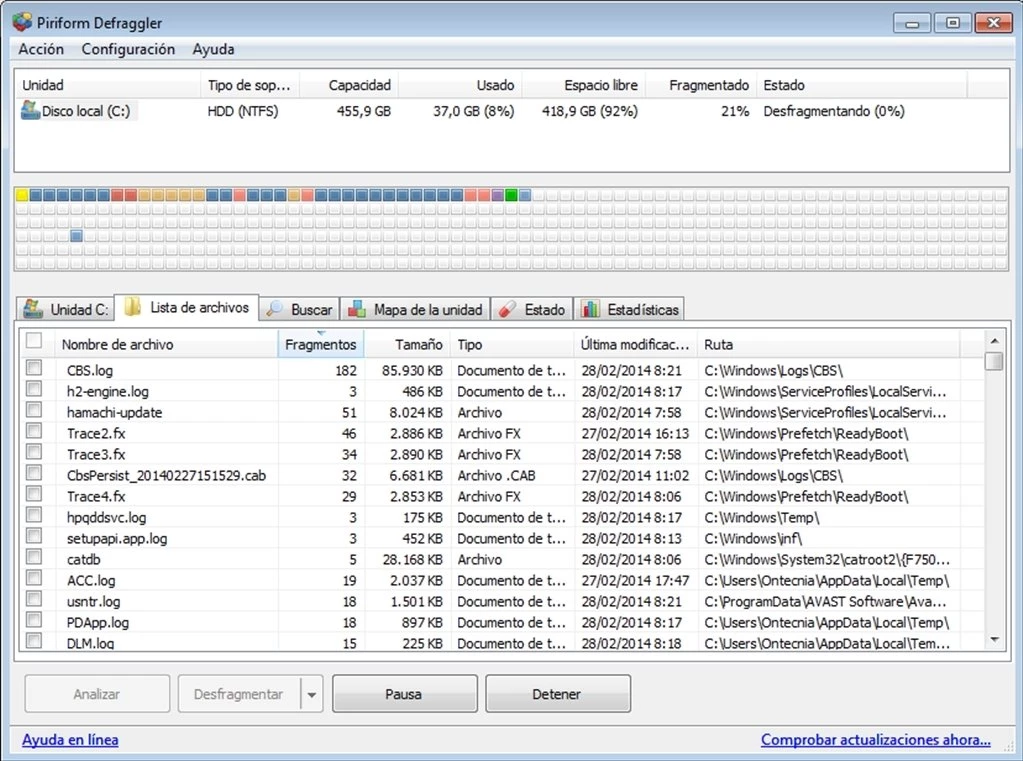
Unlike the default tools built into Windows XP, Windows 7, Windows 10, and Windows 11, which obscure the physical disk layout behind basic progress bars, this tool provides a visual map of the hardware. Users can click physical sectors to see exactly what data is stored there, diagnose drive health, and implement preventative measures to stop future files from splitting. It supports both traditional mechanical drives and modern flash storage, applying different technical methods to each to prevent unnecessary hardware wear while maximizing read speeds.
Furthermore, the application is designed to consume minimal system resources. Many storage utilities run continuously as background services, consuming RAM and CPU cycles even when the computer is idle. This application operates entirely on demand. When it is closed, it leaves no active background processes running, ensuring that full hardware power is available for demanding tasks like 3D rendering or gaming. Users can choose to set up a scheduled task using the internal menu if they prefer automation, but by default, it remains completely dormant until invoked.
Key Features
- Granular File Defragmentation: Instead of waiting for a blanket process to finish, users navigate to the File List tab after an analysis scan. Here, they can sort fragmented files by size or fragment count, check the boxes next to the worst offenders, and execute the Defrag Checked command to optimize specific assets quickly.
- Interactive Drive Map: The visual interface displays a grid of blocks representing the entire storage volume. By clicking on any colored block, users can instantly see exactly which files are stored in that physical sector, helping to diagnose why a specific partition is experiencing slow read times.
- Free Space Consolidation: Fragmentation happens when free space is scattered across the platters. By checking the Defrag Freespace option, the application moves all scattered files toward the inner tracks of the hard drive while pulling empty blocks together at the end, which prevents new installations from fragmenting.
- Boot Time Defragmentation: Certain system elements, such as the registry and paging files, are locked the moment the operating system boots. By enabling the Boot Time Defrag option, the software intercepts the startup sequence to process these locked files before the operating system claims them.
- Quick Defrag Mode: For users short on time, this setting bypasses heavy processing and only targets the most severely fragmented files. It skips the deep consolidation pass, providing a noticeable speed increase for the worst-performing files without a multi-hour commitment.
- SSD TRIM Support: Reorganizing physical blocks on a Solid State Drive degrades its lifespan because flash memory has limited write cycles. The software automatically detects flash-based storage and disables standard processing, offering an Optimize button that issues a zero-fill RETRIM command to clear discarded data blocks safely.
- Context Menu Integration: By enabling shell extension integration in the settings, users can bypass the main application window entirely. Users can right-click any folder or drive directly within Windows Explorer and select the context option to initiate localized optimization immediately.
How to Install Defraggler on Windows
- Download the Windows installer executable from the official Piriform website.
- Locate the downloaded file in your local directory and double-click to launch the setup wizard, ensuring you are logged into a Windows account with administrator privileges.
- If prompted by the Windows User Account Control prompt, click Yes to grant the installer the necessary administrative access required for low-level disk operations.
- Review the initial setup screen carefully before clicking next. The installer frequently includes optional checkboxes to bundle other software, such as CCleaner; uncheck these boxes if you only want the disk utility.
- Click the Advanced or Customise button to review system integration options. Here, you can decide whether to place an icon on the desktop and whether to add the application to the Windows Explorer right-click context menu.
- Confirm the default installation path, which is typically located in the Program Files directory on your primary partition, or specify a custom destination folder.
- Click Install to extract the application files, then select the final prompt to close the wizard and launch the disk map interface for the first time.
Defraggler Free vs. Paid
Piriform distributes the software under a freemium model. Defraggler Free is the standard tier and includes the complete feature set needed for drive optimization. Users on the free tier can perform full disk passes, isolate specific files, consolidate free space, and execute boot-time operations. The free version does not contain trial expirations, does not limit the size of the drives you can scan, and does not hide vital features behind a paywall. The business model relies on offering an unrestricted basic tool while upselling advanced support to professional environments.
The premium tier, Defraggler Professional, requires a paid license purchase, historically priced around $24.95 for a single home computer. Purchasing the Professional license does not change how the software moves files or maps the drive, nor does it unlock secret disk tools. Instead, it introduces automated background updates, ensuring the application always runs the latest build without requiring manual installer downloads.
Additionally, the Professional tier grants users priority technical support, allowing them to email Piriform directly for troubleshooting assistance regarding hardware compatibility or error codes. For the vast majority of home users, gamers, and independent professionals, the free version is entirely sufficient to maintain hard drive health. The Professional license is best suited for users who prefer a completely hands-off maintenance environment or who require guaranteed developer support. There are no mandatory monthly subscriptions, and the application functions entirely offline without requiring a cloud account to verify your free status.
Defraggler vs. Auslogics Disk Defrag vs. IObit Smart Defrag
Auslogics Disk Defrag is designed for users who want the fastest possible full-drive processing time. It uses highly optimized algorithms to blast through a heavily fragmented mechanical drive in less time than most competing utilities, and it includes tools to move critical operating system files to the fastest read zones of the disk platter. However, its interface leans heavily on automated processes, offering less granular control over individual file placement compared to Piriform's manual approach.
IObit Smart Defrag targets PC gamers and users who prefer aggressive background maintenance. It features a dedicated Game Optimizer module designed to recognize game directories and prioritize their read speeds, along with deep boot-time options and background drive health monitoring. The primary drawback is that the IObit installer is heavier, and the interface frequently prompts users to download additional system care tools from the IObit ecosystem.
Defraggler is the better fit for users who want exact control and a lightweight footprint. Instead of focusing on aggressive background automation or pushing a broader software suite, it provides a quiet, manual interface. When an IT administrator needs to inspect a drive map, locate a single massive database file, and optimize just that specific file in a few minutes, this application handles the task perfectly without wasting system resources on unnecessary background monitoring.
Common Issues and Fixes
- The software displays a "Defrag Aborted" error when trying to optimize specific files. This issue occurs if a background application, an antivirus scanner, or the Windows operating system modifies the target file after the initial analysis phase has completed. Because the physical block map is no longer accurate, the application aborts the process to prevent data corruption. To fix this, close any running programs that might be using the file, run a fresh drive analysis, and immediately execute the optimization command.
- A Solid State Drive is incorrectly identified as a mechanical hard disk drive. Windows occasionally passes the wrong hardware telemetry to the application, causing it to offer traditional defragmentation instead of safe TRIM optimization. To force Windows to reassess your hardware, open an elevated Command Prompt as an administrator, type the command "winsat formal", press Enter, and restart the computer. The application should now display the correct drive type.
- Windows System Restore points disappear after running a full drive optimization. When the drive space allocated for Volume Shadow Copies is set too low, moving massive amounts of data across the disk forces Windows to overwrite older restore points to track the file system changes. You can prevent this by opening the Windows System Protection menu, selecting your primary partition, and increasing the maximum disk space usage slider for System Restore.
- The visual fragmentation percentage does not decrease when optimizing an SSD. The application is designed to protect flash memory, meaning it does not move physical data blocks on solid-state drives, as unnecessary read/write cycles degrade the hardware. Instead, it issues a RETRIM command to tell the drive controller which blocks are empty. Because the files themselves are not moved, the visual block map and the fragmentation percentage metric will remain unchanged, even though the drive has been successfully optimized.
Version 2.22.995 — May 2018
- Added a new Privacy settings menu to the installer and introduced safety warnings when attempting to defragment SSDs, along with a command-line switch to force the operation.
- Improved hardware detection algorithms to better identify modern Solid State Drives (SSDs) and laptop storage devices.
- Fixed an issue where scheduled defragmentation tasks would fail silently without notification, and resolved user interface text clipping errors in Dutch and German localizations.