Standard Windows uninstallation routines frequently fail to remove every trace of a program. When a user relies exclusively on the built-in control panel mechanisms, the operating system executes the software's native uninstaller. However, these native uninstallers are notoriously incomplete. They often leave behind hidden application data folders, orphaned registry keys, modified system pathways, and cached temporary files. Over time, this leftover data clutters the local storage drive, causes software conflicts when reinstalling different iterations of the same app, and artificially inflates the size of the Windows Registry. Revo Uninstaller Pro is designed to intercept and manage this exact process, actively hunting down the residual files that standard procedures ignore.
Because deep system cleaning requires direct administrative access to the file system and registry hierarchy, this task must be handled by a dedicated desktop application. Browser-based utilities and lightweight diagnostic scripts cannot safely pause background services, monitor executing directories, or safely back up the registry tree before executing a deletion. Revo Uninstaller Pro bypasses these limitations by operating directly within the operating system environment. It forces broken or stubborn installations to relinquish their locked files, allowing users to regain storage space and resolve software conflicts caused by corrupted configurations.
This utility is heavily utilized by system administrators, IT support technicians, and everyday Windows users who frequently test new applications. Instead of manually navigating through hidden user directories or using native registry editors to search for obsolete vendor names, users rely on this software to automate the deep-cleaning process. By utilizing trace logs and real-time monitoring, the application ensures that the computer remains in the exact state it was before a specific piece of software was ever introduced to the hard drive.
Key Features
- Feature Name: Forced Uninstall: This function targets stubborn software that either lacks a functional uninstaller or generates error messages during standard removal attempts. By pointing the utility directly to the program's main executable file or installation folder, the engine forcibly terminates active processes and manually scours the hard drive for associated files, bypassing the broken native uninstaller entirely.
- Feature Name: Real-Time Installation Monitor: Rather than waiting to clean up a mess later, this tool actively tracks all system changes while a new application is being installed. It generates a precise trace log of every single registry modification, file creation, and folder structure adjustment, ensuring that when it is time to remove the program, the system can be restored perfectly to its previous state.
- Feature Name: Logs Database: For programs that were installed before the software was active, users can access a large online repository of pre-made trace logs maintained by the development team. These verified logs contain the exact file paths and registry keys for thousands of popular applications, allowing users to execute a highly accurate removal based on actual vendor telemetry rather than a generic post-uninstall scan.
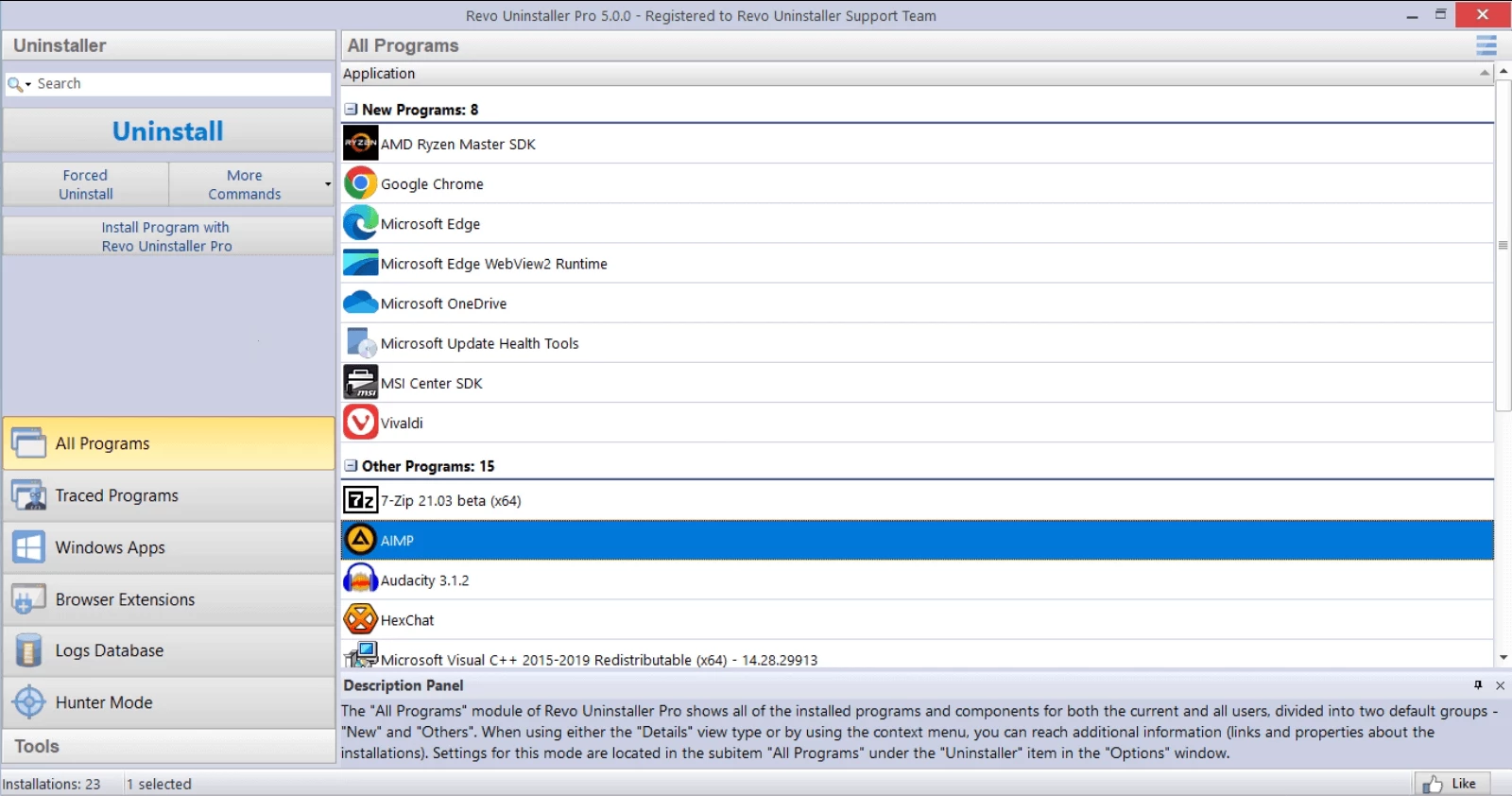
- Feature Name: Hunter Mode: This interface feature places a floating crosshair icon directly on the desktop. By dragging and dropping this crosshair over any open application window, desktop shortcut, or system tray icon, the software immediately identifies the underlying process, giving the user instant options to terminate the task, halt its auto-start behavior, or launch a deep uninstallation.
- Feature Name: Multi-Level Backup System: To prevent catastrophic accidental deletions, the engine automatically generates a full Windows System Restore Point and backs up the target registry tree before executing any file removals. If an incorrect dependency is deleted and causes OS instability, users can navigate to the Backup Manager to restore the exact registry keys that were altered during the session.
- Feature Name: Windows Apps Manager: Modern Windows environments come with pre-installed Universal Windows Platform applications that are often restricted from standard control panel removal. This dedicated module lists all default operating system apps and third-party store downloads in a single view, allowing users to forcefully strip away unwanted interface bloatware for all user accounts on the machine.
How to Install Revo Uninstaller Pro on Windows
- Download the official Windows installer executable package from the vendor's primary website.
- Locate the downloaded executable file in your local downloads folder and double-click it to initiate the setup wizard.
- When the Windows User Account Control prompt appears on the screen, click "Yes" to grant the installer the necessary administrative privileges to write to the file system.
- Select your preferred interface language from the initial dropdown menu and click "OK" to proceed to the End User License Agreement screen, where you must accept the terms to continue.
- Review the destination directory path, which typically defaults to a folder under Program Files, or use the browse button to select a different local storage drive if necessary.
- Check or uncheck the boxes for creating a desktop shortcut and a quick launch shortcut based on your workflow preferences, then click "Install" to begin unpacking the core application files.
- Once the extraction process finishes, verify the box to launch the application immediately is checked, and click "Finish" to close the wizard and load the main dashboard.
- Upon first launch, allow the software a few moments to perform an initial scan of the local drive, which populates the primary dashboard with a complete list of currently installed applications.
Revo Uninstaller Pro Free vs. Paid
The basic Revo Uninstaller Free edition provides a strictly limited toolset designed for everyday consumers who need a step up from the default Windows control panel. The free tier allows users to scan for leftover files after a standard uninstall, utilize Hunter Mode, and access eight basic system cleaning tools. However, this free version only supports standard application removal and lacks the deep scanning algorithms, forced uninstall capabilities, and real-time installation monitoring required for heavily corrupted software. It does not handle browser extension management or multi-level registry backups.
For advanced functionality, Revo Uninstaller Pro operates on a paid license model that typically costs around $24.95 for a standard single-computer license. This tier relies on a hybrid perpetual and subscription model. Purchasing a license grants the user lifetime access to that specific software iteration, along with a twelve-month subscription for updates and premium technical support. Once the twelve-month period expires, the software continues to function indefinitely without restrictions, but users must purchase a discounted renewal if they wish to download newly released updates or access updated cloud logs.
A third option exists for IT professionals and technicians known as Revo Uninstaller Pro Portable, priced slightly higher at approximately $29.95. Instead of being locked to a single physical computer, the portable license is tied to an individual user. After a one-time activation, the entire program can be stored on a USB flash drive and launched directly on an unlimited number of target machines. This tier requires no installation on the host computer, making it an ideal diagnostic utility for technicians repairing multiple devices.
Revo Uninstaller Pro vs. IObit Uninstaller vs. Geek Uninstaller
IObit Uninstaller provides a highly visual, modern interface paired with a generous free tier that appeals to everyday users. Unlike Revo's more technical dashboard, IObit includes extra utilities right out of the box, such as a software updater and a file shredder, making it a broader system maintenance tool. However, the free version of IObit frequently displays pop-up advertisements and upselling prompts, and its deep scan mode often misses obscure registry keys that a strictly dedicated uninstaller would catch. Users who want an all-in-one maintenance dashboard with automatic software updates might prefer IObit, assuming they tolerate the aggressive interface notifications.
Geek Uninstaller takes the opposite approach, focusing entirely on extreme minimalism and speed. Out of the box, the free version of Geek Uninstaller is entirely portable, requiring no installation and utilizing very few system resources. It excels at quickly identifying software and instantly force-removing broken applications without forcing the user to navigate through complex menus. However, it lacks proactive features entirely. There is no real-time installation monitor to track system changes as they happen, and it does not offer a cloud-based logs database to reference complex software behaviors. It is strictly a reactive tool for quick tasks.
Revo Uninstaller Pro remains the better fit for power users, network administrators, and individuals dealing with deeply entrenched software conflicts. While it requires a paid license to unlock its full potential, the inclusion of granular registry backups, precise real-time system tracing, and the ability to import pre-made uninstall logs makes it far safer for complex operating system environments. When an application integrates heavily into Windows Services or context menus, Revo's strict, data-driven approach ensures that pulling the software out will not accidentally break system dependencies, making it the most reliable option for deep file system management.
Common Issues and Fixes
- The built-in application uninstaller tries to repair instead of remove. Certain programs default to a repair or change wizard when their uninstaller is triggered. To bypass this loop, cancel both the built-in wizard and Revo's standard process. Instead, right-click the problematic program in the main dashboard and select "Forced MSI Uninstall" to force a strict removal command.
- Leftover registry keys appear confusingly in bold and non-bold text. During a post-uninstall scan, users often worry about deleting essential operating system keys. To prevent OS damage, only select and delete the entries marked in bold text, as the software confirms these belong specifically to the removed program. Non-bold items are shared structural paths that should be ignored.
- The software fails to launch or immediately closes after clicking the desktop shortcut. Aggressive third-party antivirus suites sometimes flag deep system cleaners as suspicious because they attempt to read locked OS directories. To resolve this, add the primary installation folder to the exclusion list of your security software.
- A target program refuses to close and prevents leftover file deletion. Background services or active system tray applications will lock their files, preventing any uninstaller from wiping the directory. Use the Hunter Mode crosshair to select the running app's window or tray icon, and choose "Terminate Process" from the context menu before starting the uninstallation workflow.
Version 5.4.5 — December 2025
- Enhanced the scanning algorithms to better detect and remove leftover files and registry entries.
- Resolved various minor bugs to improve overall program stability and performance.
- Updated language definitions to support the latest localization changes.