Setting up a new computer rarely means starting with a clean slate. Fresh operating system installations routinely arrive burdened with unwanted background services, promotional applications, and default configurations that prioritize data collection over local performance. Winhance serves as an overarching administrative dashboard designed to eliminate this initial configuration friction. Instead of forcing technicians to navigate scattered control panel menus, execute complex command-line scripts, or hunt down third-party application installers on the web, this utility centralizes the entire setup workflow into a single visual interface. It gives system administrators and local power users strict control over exactly what runs, what communicates outward, and what software packages deploy on their hardware.
Originally conceived as a command-line script, Winhance has evolved into a dedicated desktop application built entirely in C# and utilizing the modern WinUI 3 framework. This architectural choice is deliberate; manipulating local registries, removing deep-rooted legacy capabilities, and generating bootable installation media requires direct hardware and file system access that browser-based utilities cannot achieve. By integrating natively with the local application programming interfaces, the dashboard responds quickly and blends visually with native system menus, all while executing complex batch operations in the background. Users interacting with the tool are shielded from raw code but retain the exact same administrative authority as a direct registry editor.
The primary audience for this utility includes independent IT technicians, system builders, and advanced desktop users who regularly configure fresh machines. When preparing a workstation for deployment, these users face the tedious task of removing default integrations like Copilot, Microsoft Edge, or OneDrive, followed by the manual installation of daily driver software such as web browsers, media players, and document viewers. Winhance handles both ends of this process simultaneously. By connecting directly to the official Microsoft package manager repository, it batch-installs verified third-party tools while actively stripping out pre-installed bloatware, reducing an hours-long setup routine to a sequence of toggle switches and automated deployments.
Key Features
- Visual App Management: Removes built-in bloatware, legacy components, and optional features through an organized, searchable interface. Users can cleanly uninstall deeply integrated utilities such as OneDrive or Recall without risking system stability. The dashboard utilizes a color-coded legend to clarify which applications can be restored later, ensuring users understand the permanence of their selections before executing the removal process.
- WinGet Software Deployment: Installs external third-party software directly from the dashboard, bypassing the need to browse individual vendor websites. The module organizes utilities into distinct categories, including multimedia players, web browsers, and document editors. By fetching installation packages strictly through the official Microsoft package manager, it ensures users receive verified, untampered executables without manual intervention.
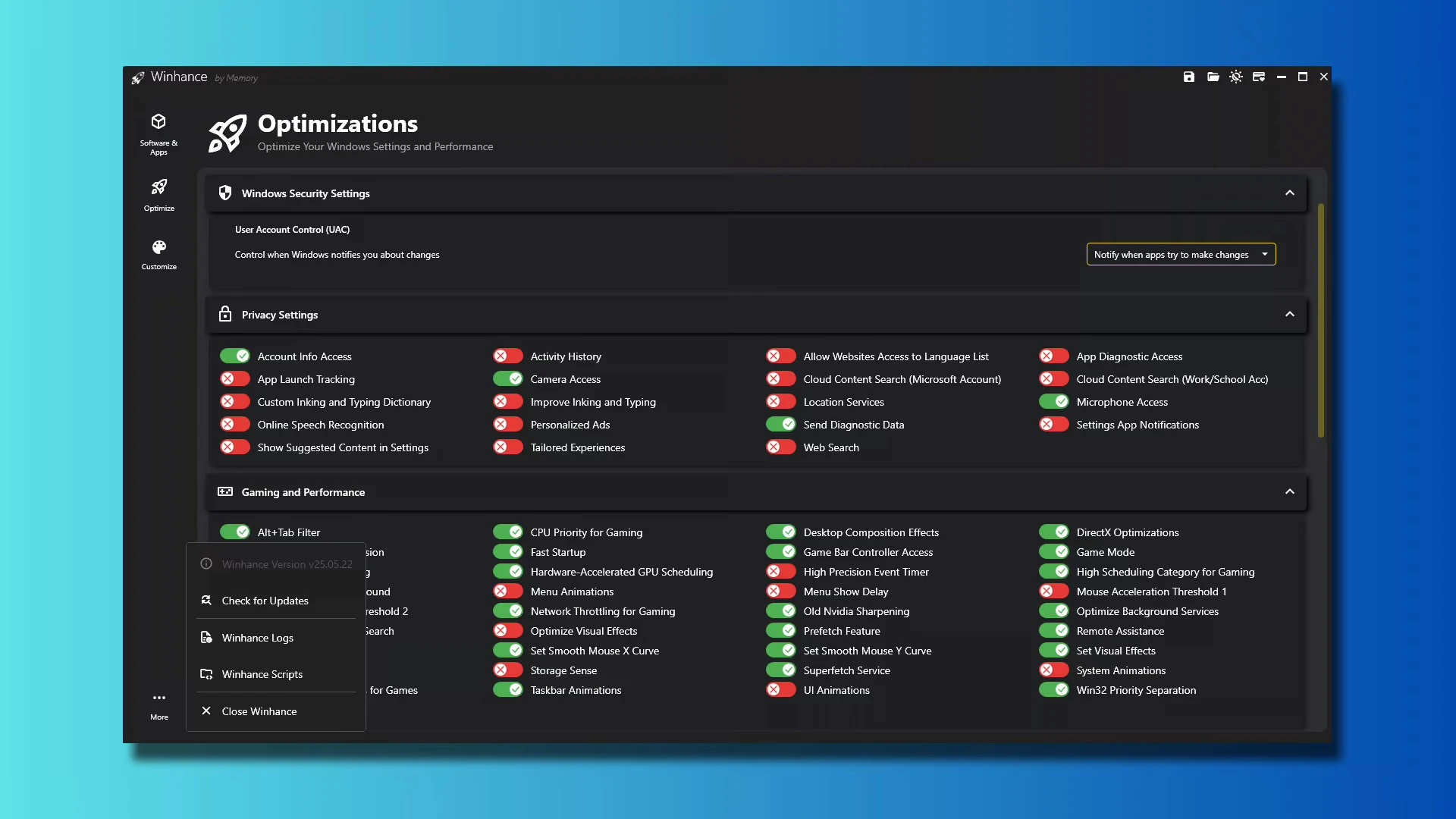
- System Optimizations: Modifies critical performance and privacy parameters directly through a set of toggle switches. The optimization categories allow users to disable outgoing telemetry, apply ultimate performance power plans, reduce gaming latency, and control driver overwrite behavior. Rather than digging through hidden administrative templates, users enforce these operational rules from one centralized screen.
- Explorer and UI Customization: Adjusts desktop behavior and interface elements to match specific user preferences. The customization module allows users to enforce the classic right-click context menu, remove web search results from the local Start Menu, and hide default navigation folders like Home or Gallery. It also provides direct controls for taskbar alignment and global dark mode enforcement.
- WIMUtil ISO Creation: Generates custom installation media and unattended configuration XML files for automated deployment workflows. Technicians can use this module to inject their specific debloat rules and driver packages directly into a bootable system image. This function allows administrators to build standardized operating system installations that automatically bypass artificial account requirements and skip unwanted default applications during the initial setup phase.
- Exportable Configuration Profiles: Saves the current dashboard selections to a dedicated local configuration file for rapid deployment across multiple machines. Once a user establishes their ideal privacy rules, UI customizations, and software installation choices, they simply export the profile. Loading this file on a secondary workstation instantly replicates the exact administrative state, bypassing the need to manually click through the menus again.
How to Install Winhance on Windows
- Download the primary Windows installer package from the official project repository or the main developer website.
- Locate the downloaded executable file within your local storage directory and double-click the package to launch the setup wizard.
- If the operating system displays a SmartScreen security warning indicating an unrecognized publisher, click the "More info" text link and select the "Run anyway" button to proceed.
- Review the initial setup options and decide whether to perform a standard local installation or extract the application files to a removable drive for portable usage.
- Follow the setup prompts to confirm the destination folder path, which typically defaults to the standard program files directory on the primary storage drive.
- Allow the extraction and file placement sequence to finish, then close the setup wizard and launch the primary application shortcut from the desktop or Start menu.
- Read and accept the mandatory initial disclaimer warning that system modifications are applied at your own risk before accessing the main optimization dashboard.
Winhance Free vs. Paid
Winhance operates under a completely free and open-source licensing model. The developer, Marco du Plessis, provides the entire system modification toolset without imposing premium tiers, hidden trial restrictions, or mandatory subscription fees. Anyone can audit the raw C# source code directly on the public project repository to verify exactly how the application modifies local registries, handles network traffic, and executes background tasks. This transparency guarantees that the utility performs its stated functions without introducing secondary tracking mechanisms or hidden monetization schemes.
Because the project avoids commercial segmentation, all advanced deployment features are permanently unlocked for every user. Technicians deploying the utility in commercial environments have immediate access to the WIMUtil ISO creator, unattended XML generation, and the bulk software deployment modules without procuring an enterprise license. The application does not restrict the number of packages you can uninstall, the volume of configuration files you can export, or the type of operating system editions you modify.
The development and continuous maintenance of the utility are sustained entirely through optional community support. Users who find the software useful for their personal machines or professional deployment workflows can contribute via integrated donation links pointing to platforms like Ko-fi and PayPal. This direct support model ensures the software remains focused on technical utility rather than artificial feature gating, providing a reliable, unrestricted administrative tool for independent IT professionals and casual users alike.
Winhance vs. Winaero Tweaker vs. O&O ShutUp10++
Winaero Tweaker is a legacy configuration tool that provides granular access to hundreds of hidden registry keys, legacy context menu entries, and highly specific visual styling options. It excels at micro-managing aesthetic elements, such as modifying scrollbar widths or restoring obsolete volume sliders. Users should choose Winaero Tweaker if they exclusively want to modify specific desktop interface behaviors without needing bulk application uninstallers, third-party software deployment, or ISO generation tools.
O&O ShutUp10++ focuses strictly on privacy and security, providing a dense matrix of telemetry toggles designed to stop background data collection and external communication. It categorizes privacy settings by safety level, ensuring users do not accidentally break critical system functions. It is the better choice for users who want a portable, single-purpose executable to silence tracking services, but it lacks any functionality for uninstalling bloatware, customizing the taskbar, or downloading verified external software packages.
Winhance serves as the stronger overarching setup workflow because it combines application management, system optimization, software installation, and custom installation media generation into one modern dashboard. Rather than relying on separate programs to block telemetry, remove unwanted integrations, and install media players, administrators can execute the entire initial configuration routine from a single interface. It is the ideal choice for configuring a completely fresh operating system installation from scratch.
Common Issues and Fixes
- SmartScreen blocks the executable during installation. Because the independent developer does not maintain an expensive commercial code-signing certificate, the default security filter often flags the installer as an unrecognized application. Click the "More info" link on the blue warning popup and select the "Run anyway" button to allow the setup wizard to continue safely.
- Windows updates revert system optimizations. The application applies administrative settings once upon request, but major OS update routines frequently reset default privacy and power configurations. Export your custom configuration file within the Winhance application, then re-import it after a major system update to immediately reapply your preferred rules.
- Removed built-in applications reappear after restarting the computer. Background servicing tools occasionally redownload bloatware if they detect missing default packages during idle maintenance. Use the built-in startup script generator located in the Windows Apps Help menu to enforce automatic removal commands every time the system boots.
- Certain Store applications crash after executing a bulk debloat command. Utilizing the "Select All" removal option can accidentally strip out shared legacy capabilities required by other installed programs. Reopen the Windows Apps & Features section, consult the built-in explanatory legend, and individually reinstall the specific dependencies required by your malfunctioning software.
- Custom power plans fail to activate on restricted hardware. Some laptop manufacturers lock processor power states at the BIOS level, preventing external utilities from forcing ultimate performance modes. If the specialized power configuration fails to apply, open the Power Management tab and switch to the standard high-performance option instead.
Version 26.02.20 — February 2026
- Introduced a real-time terminal window to monitor application installation and removal progress.
- Implemented Chocolatey as a secondary uninstallation fallback for software that WinGet fails to remove.
- Resolved an issue causing false-positive reports in WinGet where applications falsely appeared as uninstalled.
- Corrected various bugs with Over the Shoulder (OTS) UAC elevation, providing better registry detection, accurate user account matching, and overall performance enhancements.
- Fixed a display bug that prevented the application from matching the logged-in user's theme during OTS elevation.
- Eliminated redundant File Explorer restarts when importing configuration settings.
- Addressed an error in the config review mode that incorrectly counted settings hidden by Windows version filters.
- Prevented custom theme settings from unexpectedly resetting and minimized excessive background logging.
- Fixed inverted values affecting the jаvascript Timer Frequency power options.