Magnet AXIOM is a unified digital forensics platform that ingests computer, mobile, and cloud evidence and lets examiners analyze it together with tools like Timeline and Connections for faster, defensible insights.
MAGNET AXIOM Key Features And Interpretations
How to build a timeline in Magnet AXIOM for a Windows case
Use Timeline to pivot by time ranges, artifact types, and activity bursts, then drill down to underlying files to validate findings. For speed, start with artifact-first processing and layer file system views only when verification is needed.
How to correlate artifacts across devices using Connections in Magnet AXIOM
Map people, devices, apps, and communications to surface relationships that would be easy to miss in siloed tools. Combine Connections with Timeline to prove sequence and context in one view.
What is the best way to analyze iCloud and Google Drive data in Magnet AXIOM
Acquire tokens and credentials where available, then process cloud sources alongside disk and handset images to keep context intact. Include OneDrive and collaboration apps to capture cross‑platform trails.
Magnet axiom artifact explorer complete artifacts list 2025
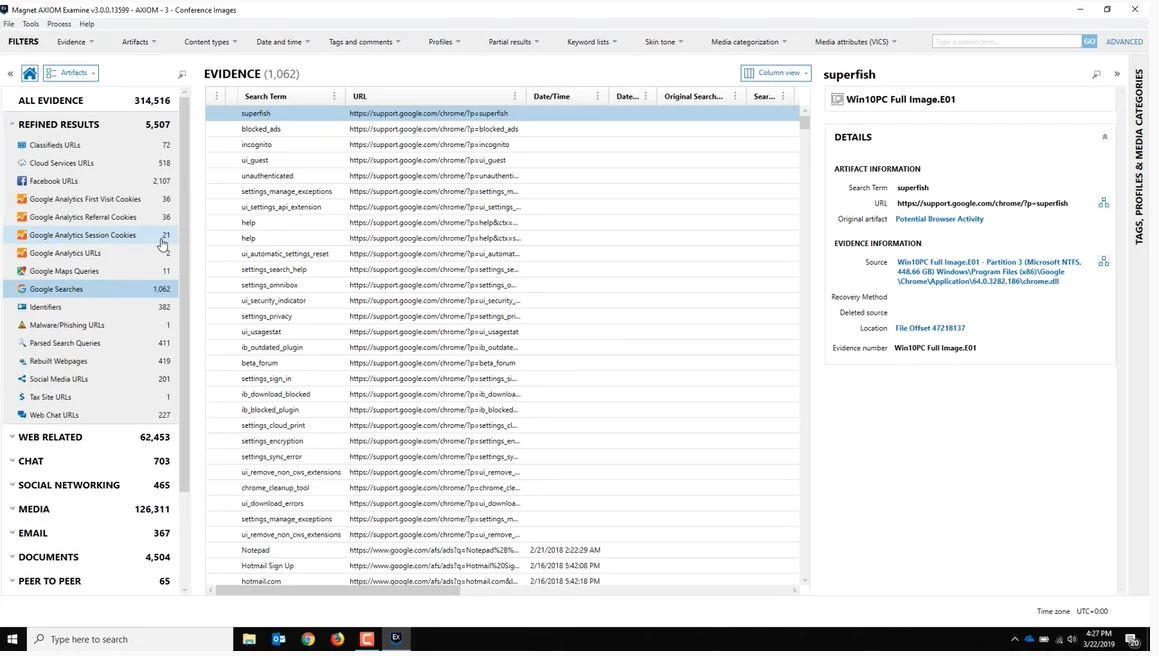
Use Artifact Explorer to review normalized artifacts (browsers, chats, media, system usage) across sources in a single schema for faster triage.
Magnet axiom email explorer features and review
Parse mailboxes, attachments, and headers, pivot to related artifacts, and include selected messages in reports for legal review.
Magnet axiom export reporting templates pdf csv excel
Build scoped, court‑ready reports with selected artifacts and fields, exporting to PDF, CSV, or Excel for disclosure and eDiscovery.
How to export a court‑ready report in Magnet AXIOM with selected artifacts
Filter by person, time, and artifact types, then export only what is needed to reduce noise.
Free Download — Magnet AXIOM 5.4.0.26185
What’s New In Recent Versions
Magnet AXIOM 5.4.0.26185
Improved VICS exporting via Media Explorer to reduce duplicate media in Project VIC/CAID workflows.
Better HEIC parsing for iOS images, aiding media‑heavy and CSAM investigations.
WhatsApp UX and reporting enhancements (usernames in chat bubbles), plus updated Signal, Snapchat, and Wickr artifacts.
AXIOM Cyber 5.4 adds proxy server support for remote endpoint collection and updated artifacts (e.g., Zoom, Recycle Bin).
Magnet AXIOM 4.8
Added off‑network remote collections saved to an open, forensically sound AFF4‑L logical container
Usable by any tool that supports the standard.
Magnet AXIOM 3.0
Introduced the enhanced Timeline Explorer
Improving speed and investigation flow for time‑based analysis.
Recovery And Artifacts
Can Magnet AXIOM recover WhatsApp messages and attachments from iPhone and Android?
Yes. AXIOM parses WhatsApp chats and attachments, with recent UI/reporting improvements for clearer attributions. Use Artifact Explorer to cover browsers, social apps, media metadata, and system traces in one pass to catch cross‑source patterns.
IR/Malware Cases And Memory
Does Magnet AXIOM support volatile memory acquisition and analysis
AXIOM supports acquiring volatile memory and analyzing it alongside disk artifacts to expose processes, network traces, and injected modules.
Magnet axiom memory acquisition and analysis step by step
Leverage integrated memory analysis to correlate processes and artifacts with user activity and timeline windows for faster scoping in incident response.
Integrations And Collaboration
Magnet axiom aff4‑l forensic container format explained
AFF4‑L is an open, forensically sound logical container used for remote collections. It supports resumable transfers and cross‑tool interoperability.
How do I remotely collect data with Magnet AXIOM Cyber from a Mac endpoint
Use AXIOM Cyber’s remote collection (including proxy‑aware collection in 5.4) for Mac, Windows, and Linux—on‑ or off‑network—to an AFF4‑L container.
How to use queued remote collections in Magnet AXIOM Cyber to speed up cases
Scale concurrent collections and processing, optionally with cloud‑powered Magnet Nexus, to cut dwell time across many endpoints.
Magnet axiom cyber yara rules configuration guide and magnet axiom virustotal integration setup tutorial
Teams often pair AXIOM workflows with YARA scans and external reputation checks (e.g., exporting hashes for VT lookups) to enrich findings and automate triage where policy allows.
Comparison With Cellebrite And MSAB XRY/XAMN
Mobile application coverage
Cellebrite : Strong acquisition/decoding depth for handsets and apps. Excels in mobile‑first labs.
MSAB XRY/XAMN : Robust mobile acquisition and analytical views tuned for handset data review.
AXIOM : Competitive mobile artifact parsing plus unified computer/cloud analysis to keep context intact.
Cross‑device correlation and timeline
AXIOM : Connections and Timeline bring multi‑source activity into one narrative.
Cellebrite/MSAB : Powerful mobile reviews. Cross‑device context may require exports into additional tools or workflows.
Cloud and remote collections
AXIOM : Built‑in cloud acquisition and enterprise‑grade remote collections (including proxy support and AFF4‑L).
Cellebrite/MSAB: Cloud and remote capabilities vary by module. Many labs pair outputs with AXIOM for deeper correlation.
You can find more specialized programs in the System Utilities section.
How To Use MAGNET AXIOM — Pro Tips
Start with Timeline filters . Use relative ranges like “last 7 days” to narrow leads quickly.
Tag artifacts by person/app early, then pivot to Connections to validate relationships.
Scope cloud acquisitions narrowly (folders/accounts) to reduce noise and processing time.
Build reusable report templates for different stakeholders (legal, IR, management).
For IR, collect volatile memory first on live systems before disk imaging to preserve runtime context.
MAGNET AXIOM System Requirements
OS : Windows 10/11 64‑bit.
CPU : Modern 4+ core processor.
RAM : 16 GB minimum, 32 GB recommended for large cases.
Storage : SSD with 250 GB+ free.
Conclusion
This software stands out by blending mobile, computer, and cloud evidence in one case file and by giving investigators narrative tools—Timeline and Connections—that compress time‑to‑insight without sacrificing validation. Anchored by enterprise‑ready remote collections to AFF4‑L, practical reporting to PDF/CSV/Excel, and steady artifact updates (including WhatsApp and HEIC), it fits law enforcement, corporate IR, and eDiscovery teams that need speed, scale, and defensibility.
Frequently Asked Questions about Magnet AXIOM
1. Is Magnet AXIOM available by subscription or one-time purchase?
Magnet AXIOM is sold as a yearly subscription license. Perpetual (one-time) licensing is not available.
2. What is the main function of Magnet AXIOM?
It recovers, analyzes, and reports digital evidence from computers, mobile devices, the cloud, and external sources in a unified case file.
3. Can Magnet AXIOM process evidence from cloud services or social media?
Yes, you can acquire and analyze data from cloud accounts (like Google, Facebook, Instagram) as well as from social media returns.
4. How do I extract evidence from a mobile device using AXIOM?
Connect the device, select acquisition type, follow prompts to extract data, and AXIOM will process, index, and display results in your case.
5. Does AXIOM support automated artifact analysis?
Yes, AXIOM automatically identifies and categorizes forensic artifacts such as messages, images, browser history, and user activity for fast review.