When standard uninstallation methods fail to completely clear McAfee security software from your system, the McAfee Consumer Product Removal tool (MCPR) serves as the definitive cleanup utility. This specialized application is designed to locate and eliminate stubborn residual files, registry keys, and drivers that often remain after a typical removal attempt. By ensuring every trace of the antivirus suite is wiped from your Windows machine, it prepares your computer for a fresh security installation without the risk of software conflicts.
Key Features
- Deep System Cleaning: Scans the Windows registry and file system to identify and delete hidden remnants of McAfee products that standard uninstallers miss.
- Broad Product Support: effectively removes a wide range of consumer suites including McAfee Total Protection, LiveSafe, Internet Security, and AntiVirus Plus.
- Portable Execution: Runs directly as a standalone executable file without requiring installation, making it easy to run from a USB drive or local folder.
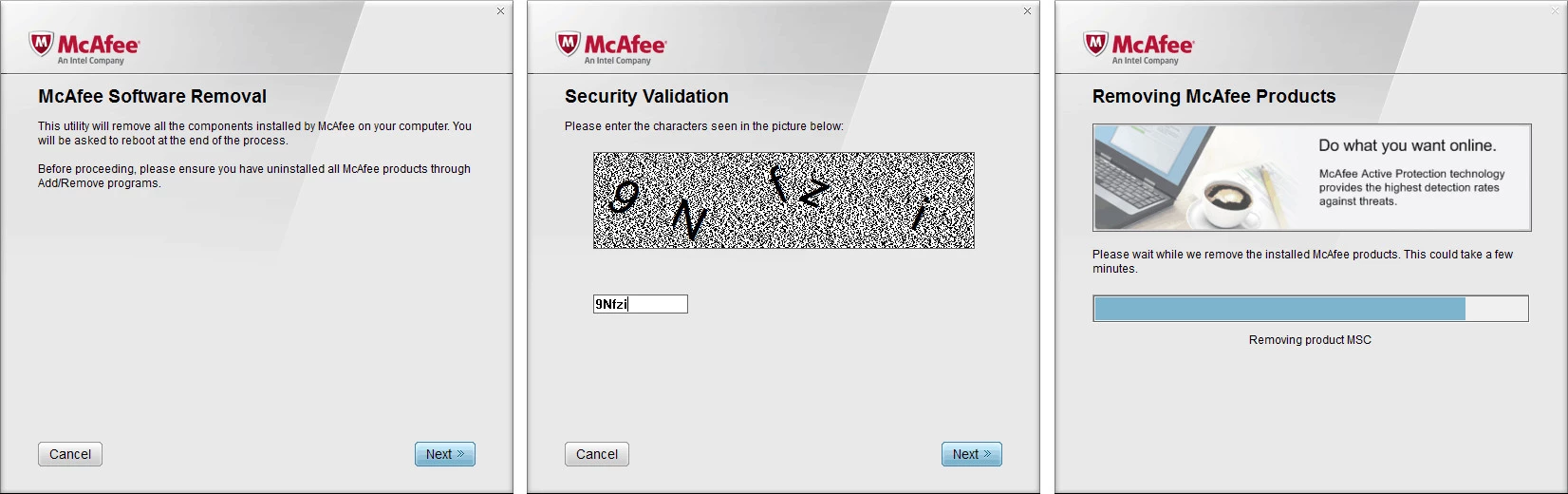
- Security Validation: Includes a built-in CAPTCHA verification step to prevent accidental execution by malware or automated scripts.
- Conflict Prevention: Clears old configuration data that could otherwise trigger compatibility errors when installing new antivirus solutions.
Use Cases
This tool is essential for home users and IT technicians who encounter error messages during a standard uninstallation or need to fix a corrupted McAfee installation. It is also the recommended first step for anyone switching to a different security provider, ensuring the new software runs on a completely clean Windows environment.
For users seeking a guaranteed clean slate, this utility offers a reliable method to finalize the removal process and restore system stability.
Version Latest — 2025
- Expanded compatibility to detect and remove the latest McAfee consumer product releases.
- Enhanced cleanup algorithms to eliminate stubborn residual files and registry keys more effectively.
- Optimized removal process for better stability on the newest Windows 10 and 11 updates.