Trapcode Particular is the industry-standard particle system plugin for Adobe After Effects, designed to create organic 3D particle effects that native tools cannot achieve. It allows motion graphics artists to generate complex elements like smoke, fire, rain, and sparks, as well as abstract geometric shapes and lines. By working within a true 3D space, it integrates fully with After Effects' camera and lighting systems, making it an essential tool for high-end visual effects and motion design.
Key Features
- Fluid Dynamics: Simulate realistic fluid behavior, allowing particles to swirl, mix, and move like liquid or air.
- Parent/Child Systems: Create cascading effects where a primary 'parent' emitter releases 'child' emitters, enabling complex trails and multi-stage particle generation.
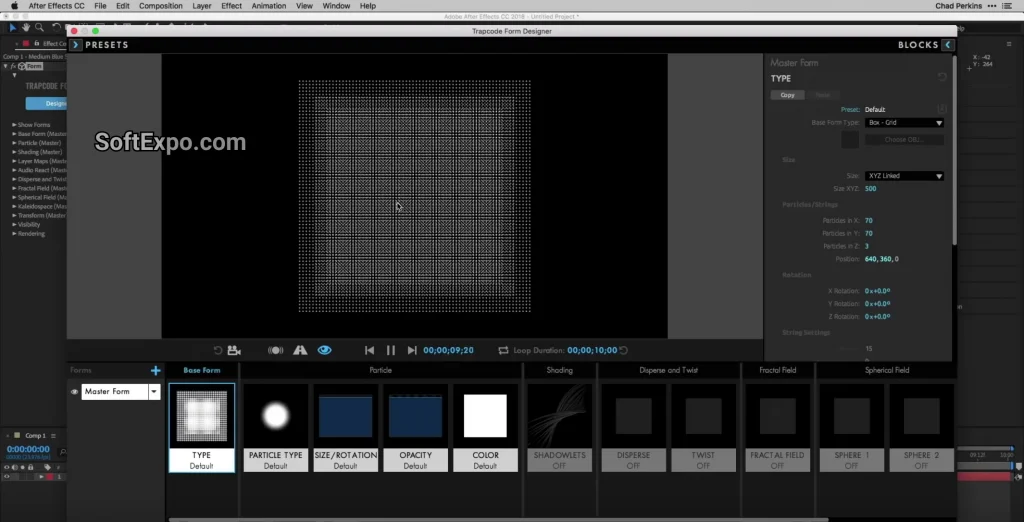
- Designer Interface: A visual block-based interface that lets you build effects intuitively and browse over 355 customizable presets.
- 3D Camera & Light Integration: Particles react to the After Effects 3D camera and lights, supporting depth of field and shadow casting.
- Textured Polygon Particles: Use any 3D model or custom layer as a particle, allowing for the creation of flocks, swarms, or floating debris fields.
- Physics Engine: Advanced controls for air resistance, turbulence, gravity, and bounce, simulating real-world interaction with simulated floors or walls.
Installation and Setup
To install Trapcode Particular on a Windows system, you must use the Maxon App, which manages licensing and updates for the Red Giant suite. Begin by downloading the Maxon App from the official Maxon website and signing in with your account credentials. Navigate to the 'Products' tab, locate 'Trapcode Suite,' and click the 'Install' button. The installer will automatically detect your installed versions of Adobe After Effects and place the necessary plugin files in the correct directory. Once the process is complete, launch After Effects; you will find the plugin under the Effect menu in the RG Trapcode category.
How to Use Trapcode Particular
The standard workflow begins by applying the effect to a solid layer (Ctrl+Y). Open the 'Designer' by clicking the button in the Effect Controls panel to visually build your look using blocks and presets. For manual control, start with the 'Emitter' group to define how particles are born—choosing between Point, Box, or Sphere emitters. Next, adjust the 'Particle' settings to define the look (size, opacity, color over life) and the 'Physics' group to control movement. A common best practice is to use the 'Aux System' to create trails behind your main particles, adding density and richness to the effect without overloading the processor.
Compatibility
As of January 2026, Trapcode Particular requires a 64-bit version of Windows 10 or Windows 11. It is fully supported in Adobe After Effects 2025 and After Effects 2026. For optimal performance, a discrete GPU from NVIDIA or AMD with at least 4GB of VRAM is recommended to handle the render-heavy physics calculations.